Cryptoriarium Futures PNL Calculator: Plan Your Trade Before You Enter
 Cryptoriarium4 min read·Just now
--
Trading crypto futures without calculating risk first is one of the fastest ways to lose control of a position. The Cryptoriarium Futures PNL Calculator helps traders estimate potential profit, fees, funding cost, liquidation risk, and reward-to-risk before opening a trade.
Try the calculator here:
https://futures-pnl-calculator.cryptoriarium.site
What Is the Cryptoriarium Futures PNL Calculator?
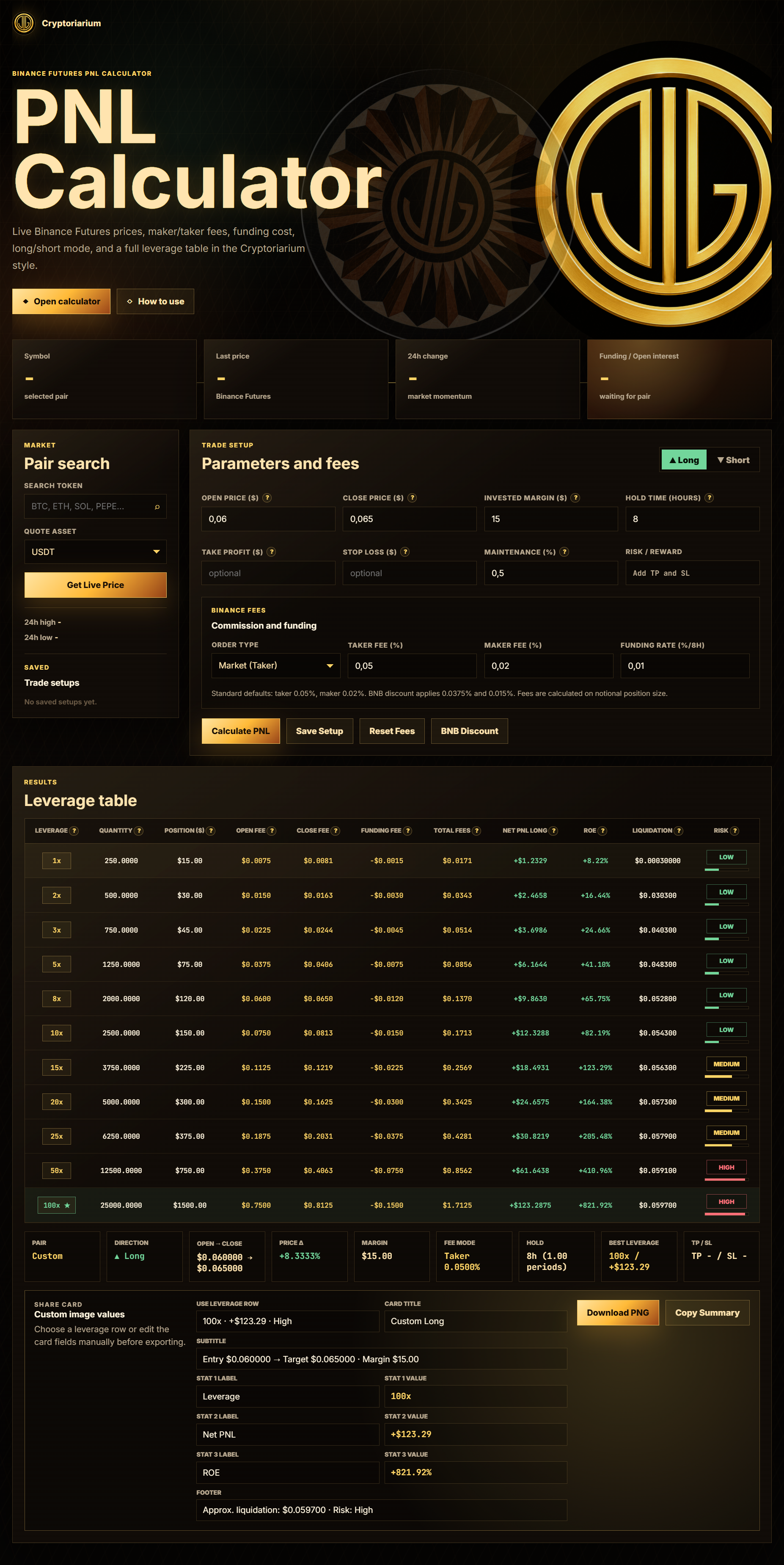
The Cryptoriarium Futures PNL Calculator is a browser-based tool for estimating crypto futures trade outcomes. It allows you to enter your trade setup, choose long or short direction, configure fees, add take-profit and stop-loss levels, and compare results across multiple leverage levels.
The calculator is designed for traders who want a clearer picture of a futures position before committing capital.
Key Features
1. Live Binance Futures Pair Search
You can search for a trading pair and load live market data from Binance Futures. The tool can automatically fill the current price and show market information such as price change, funding rate, and open interest.
This makes it easier to start with realistic market values instead of entering everything manually.
2. Long and Short Trade Support
The calculator supports both long and short futures positions. You can manually choose the direction or let the calculator infer it from your open and target prices.
This is useful for quickly comparing bullish and bearish scenarios.
3. PNL, ROE, Fees, and Funding
For each leverage level, the calculator estimates:
- Position size
- Token quantity
- Open fee
- Close fee
- Funding fee
- Total fees
- Net PNL
- ROE
Instead of looking only at gross profit, you can see a more realistic estimate after trading costs.
4. Approximate Liquidation Price
The calculator also shows an approximate liquidation price for every leverage level. This helps you understand how close your position may be to liquidation under different leverage conditions.
Please note that real liquidation prices can vary depending on exchange rules, margin mode, maintenance margin tiers, and account settings.
5. Risk Level Indicator
Each leverage row includes a risk label and visual risk bar. The tool marks positions as low, medium, or high risk based on leverage and distance to liquidation.
This makes it easier to scan the table and avoid setups that look profitable but carry extreme liquidation risk.
6. Take-Profit and Stop-Loss Mode
The calculator includes optional take-profit and stop-loss fields. If a take-profit value is entered, it becomes the target price used for the PNL calculation. The stop-loss value is used to estimate the reward-to-risk ratio.
This helps traders compare whether a setup is worth taking before opening the position.
7. Save Trade Setups
You can save your trade setups directly in the browser. When saving a setup, you can give it a custom name and load it again later.
This is useful for comparing different market scenarios or keeping track of trade ideas.
8. Custom Share Card
After calculating a setup, the tool generates a share card section. You can choose which leverage row to use, edit the title, subtitle, stats, and footer, then download a PNG image.
This is useful for sharing trade scenarios, educational examples, or social media posts.
Why Use a Futures PNL Calculator?
Crypto futures trading can be misleading if you only focus on leverage and potential profit. A trade that looks attractive at first may become much less appealing after fees, funding, and liquidation risk are included.
A calculator helps answer important questions before entering a position:
- How much can I realistically gain or lose?
- What will fees do to my result?
- How does funding affect the trade?
- Which leverage level is too risky?
- Where is the approximate liquidation price?
- Is the reward-to-risk ratio acceptable?
The Cryptoriarium Futures PNL Calculator brings these answers into one clear interface.
Who Is It For?
This tool is useful for:
- Crypto futures traders
- Beginners learning leverage and risk
- Content creators explaining futures scenarios
- Traders comparing long and short setups
- Anyone who wants to understand fees, funding, and liquidation risk before entering a position
Final Thoughts
The Cryptoriarium Futures PNL Calculator is built to make futures trade planning clearer and more visual. It does not replace risk management, but it gives traders a better framework for understanding potential outcomes before placing an order.
Try it here:
https://futures-pnl-calculator.cryptoriarium.site
Use it to test scenarios, compare leverage, estimate fees, and plan trades with more confidence.
Let us know how you use the tool, which features helped you the most, and what improvements you would like to see next. Your feedback helps make the calculator more useful for every trader.