Creata Sync SDK: Integrating WalletConnect into Your dApp — A Complete Developer Guide
 Creatachain Official3 min read·Just now
--
Learn how to connect your decentralized application to the Creata Sync mobile wallet using the WalletConnect v2 protocol, with support for Zenith Chain, Catena Chain, and EVM-compatible networks.
Introduction
CreataChain has published a new Platform Guide introducing the Creata Sync SDK — the official developer toolkit for integrating the Creata Sync mobile wallet (formerly Creata Wallet) into decentralized applications (dApps) via the WalletConnect protocol.
What Is Creata Sync?
Creata Sync is CreataChain’s mobile wallet that enables users to securely manage digital assets across multiple blockchain networks. The wallet natively supports the following blockchain networks:
• Zenith Chain — CreataChain’s native non-CVM, high-performance chain, fully supported and seamlessly integrated into the wallet by default.
• Catena Chain — Native support for both the Catena CIP-20 Mainnet and Testnet. Additional CVM-compatible networks can also be added via custom RPC URLs.
• EVM-Compatible Chains — Pre-configured with Ethereum Sepolia, Binance Smart Chain Testnet, Avalanche Fuji, and Polygon Amoy. Additional EVM Mainnet, Testnet, or custom EVM-based networks can be added via custom RPC URLs.
What Is WalletConnect?
WalletConnect is an open-source protocol that enables secure communication between decentralized applications (dApps) and crypto wallets. It uses encrypted peer-to-peer communication to establish a secure connection between a wallet and an application. This eliminates the friction of browser extensions and allows users to connect directly with their mobile wallet.
Integration Overview
Prerequisites
• Install Creata Sync — Download Mobile Wallet from Play Store or App Store
• WalletConnect Project ID — Register and create a project on WalletConnect Cloud
• Web3 Library — Install a Web3 library compatible with your platform
• WalletConnect SDK — Install the WalletConnect v2 SDK
Installation
Install the required WalletConnect packages for your dApp:
npm install @walletconnect/sign-client @walletconnect/utils @walletconnect/types
npm install @reown/appkit
Connection Methods
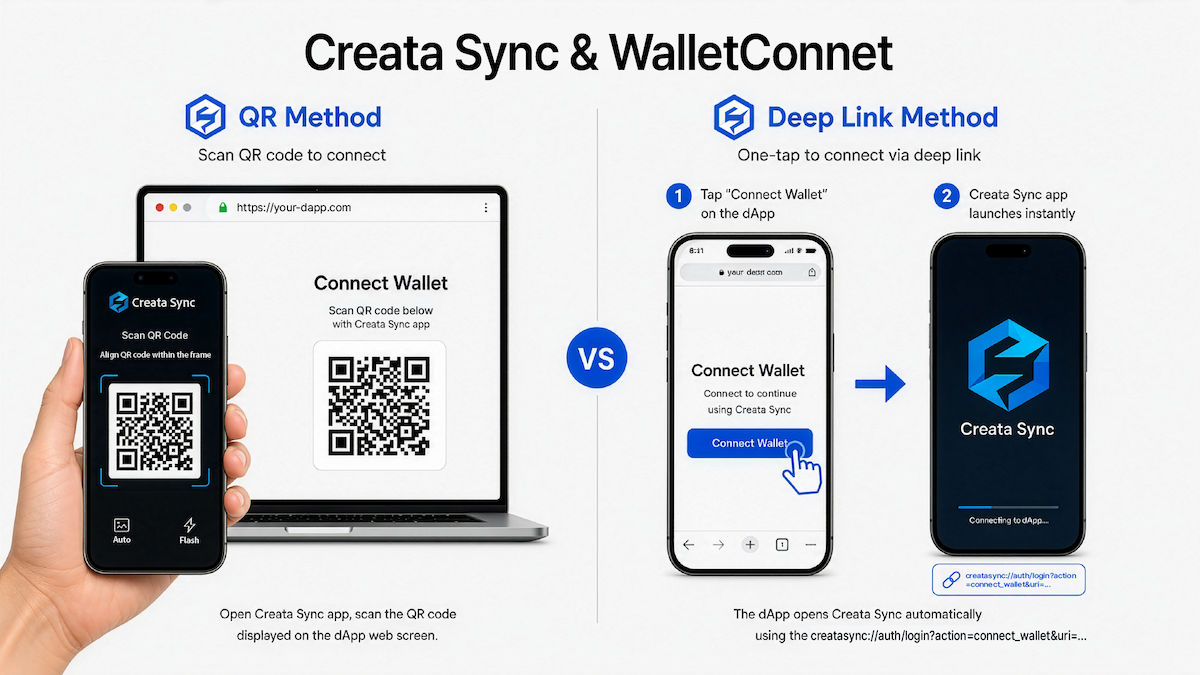
Creata Sync supports two connection flows:
• QR Code Scanning — The dApp displays a WalletConnect URI as a QR code, and the user scans it with the Creata Sync app.
• Deep Link QR Code — The QR code contains a custom deep link (creatasync://auth/login?action=connect_wallet&uri=…). When scanned with a standard device camera, the link opens Creata Sync directly and starts the connection handshake.
Supported Namespaces
The SDK supports three namespaces, each with distinct chain IDs, methods, and events:
- eip155 — EVM-compatible chains: Ethereum Sepolia, Polygon, BNB Smart Chain, Avalanche Fuji, Polygon Amoy, and others
- catena — Catena Chain (Mainnet: catena:9000, Testnet: catena:1000)
- zenith — Zenith Chain (zenith:main-chain-1)
Methods Overview
Event Listeners
WalletConnect events allow your dApp to respond to user actions in their wallet. These events are emitted by the WalletConnect SignClient instance and handled via client.on().
Error Handling & Best Practices
The guide provides a complete error map for WalletConnect error codes:
• 4001 — User rejected the request
• 4100 — Unauthorized method — wallet does not support this method
• 4200 — Unsupported method
• 4902 — Unrecognized chain ID — network not added to wallet
• -32000 — Invalid input or insufficient funds
• -32002 — Resource unavailable
• -32003 — Transaction rejected or execution failed
• -32602 — Invalid params — check your request parameters
• -32603 — Internal error — try again later
Key best practices for integration:
• Check Connection Status — Track connection state in your UI so users always know whether the wallet is disconnected, connecting, connected, or in an error state.
• Handle Network Changes — Always listen for accountsChanged and chainChanged events and update your application state accordingly.
• Implement Session Persistence — Persisting the active session allows users to return to your app without reconnecting every time they reload or reopen it.
Documentation
The full Creata Sync SDK documentation is available at: