From monolithic AI scripts to an autonomous agent mesh that reads, reasons, and writes code, all with Protolink.
In my previous post, we built a Vacation Booking System, consisting of a mesh of agents that plan and book trips based on the user’s prompt. It showed how agents can discover each other, delegate work, and collaborate autonomously.
This time, we’re building something every developer will instantly relate to: a simplified Claude Code, an AI coding assistant that can read your files, reason about changes, and write code. And we’re going to build it with just three agents and about 200 lines of meaningful code.
This example also showcases the automated delegation of tasks which Protolink enables through the Agent-to-Agent (A2A) protocol.
A2A transforms isolated agents into a discoverable network. Instead of hard-coding connections, agents use a single protocol to request services from each other. This keeps the system modular, whether an agent needs a file read or a complex code analysis, the interaction is standardized and fully autonomous.
The Idea: Brain ≠ Hands ≠ Coordinator
Every coding assistant (e.g. Claude Code, Cursor, GitHub Copilot) shares the same fundamental architecture under the hood:
- A brain that reasons about code (what to change, how to change it)
- Hands that execute file operations (read, write, search)
- A coordinator that manages the workflow (what to do first, what to do next)
In traditional frameworks, these responsibilities are tangled inside one monolithic script. With Protolink, we separate them into autonomous, interoperable agents that communicate over the network.
Why does this matter? Because the brain that generates code should not be the same component that writes files. Separation makes the system safer, more testable, and independently scalable.
The Architecture
User: "Add type hints and docstrings to utils.py"
     │
     ▼
┌───────────────────────────────────────────────┐
│            ORCHESTRATOR AGENT                 │
│            (LLM - Coordinator)                │
│                                               │
│  1. agent_call → coder.list_directory(".")    │
│  2. agent_call → coder.read_file("utils.py")  │
│  3. agent_call → planner.infer("Improve...")  │
│  4. agent_call → coder.write_file(new_code)   │
│  5. Returns summary to user                   │
└───────────────────────────────────────────────┘
         │                         │
         ▼                         ▼
┌──────────────────┐    ┌──────────────────────┐
│  PLANNER AGENT   │    │    CODER AGENT       │
│  (LLM - Brain)   │    │    (Tools - Hands)   │
│                  │    │                      │
│  • Analyze code  │    │  • read_file()       │
│  • Create plans  │    │  • write_file()      │
│  • Generate edits│    │  • list_directory()  │
│                  │    │  • search_in_files() │
└──────────────────┘    └──────────────────────┘
Three agents, two types of delegation:
- infer → Ask another agent's LLM to reason (Orchestrator → Planner)
- tool_call → Ask another agent to execute a tool (Orchestrator → Coder)
All discovered dynamically via the Registry, think of it as a live network phonebook where agents list their capabilities and URLs at startup. No hard-coded URLs. No tight coupling.
Security by Design Notice that the Planner (the Brain) has zero access to your files. It can propose changes, but it lacks the tools to execute them. By separating the “thinking” from the “doing,” Protolink creates a natural security boundary that monolithic scripts can’t provide.
Protolink’s Plug-and-Play Agent Architecture
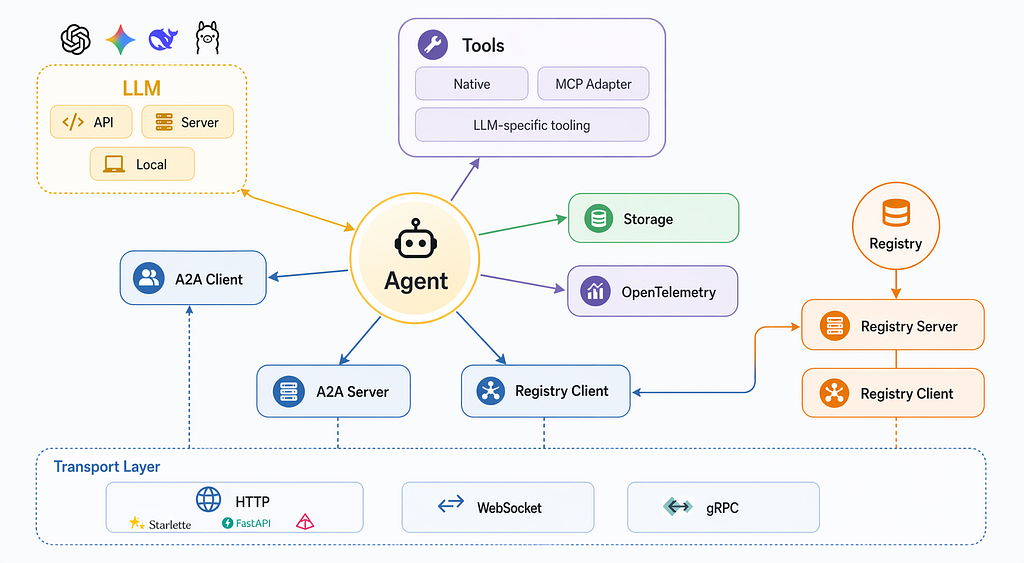
Before we dive into the specific agents, it’s worth highlighting the modular foundation that makes this possible. Protolink provides a centralized Agent class that acts as a unified hub. You can "plug in" exactly what each specialist needs:
- LLMs: Use any model from any provider via a unified LLM class. Whether it's a cloud-based API (OpenAI, Anthropic, Gemini), a self-hosted Server (Ollama, vLLM), or even a Local model running directly in your process.
- Tools: Convert standard Python functions into discoverable capabilities, or even plug in external tool ecosystems like MCP (Model Context Protocol) using built-in adapters.
- Transport & Storage: Choose how agents communicate (HTTP, WebSockets) and where they persist their history or state (Redis, Postgres, local JSON).
For this coding assistant, while you can swap in any model with one line of code, we are going to showcase the power of local, private reasoning. We’ll be using the Ollama client running Google’s Gemma model. It’s a powerful, high-performance model that allows you to run this entire multi-agent mesh entirely on your own hardware, for free, with zero data leaving your machine.
The following figure showcases the agents:
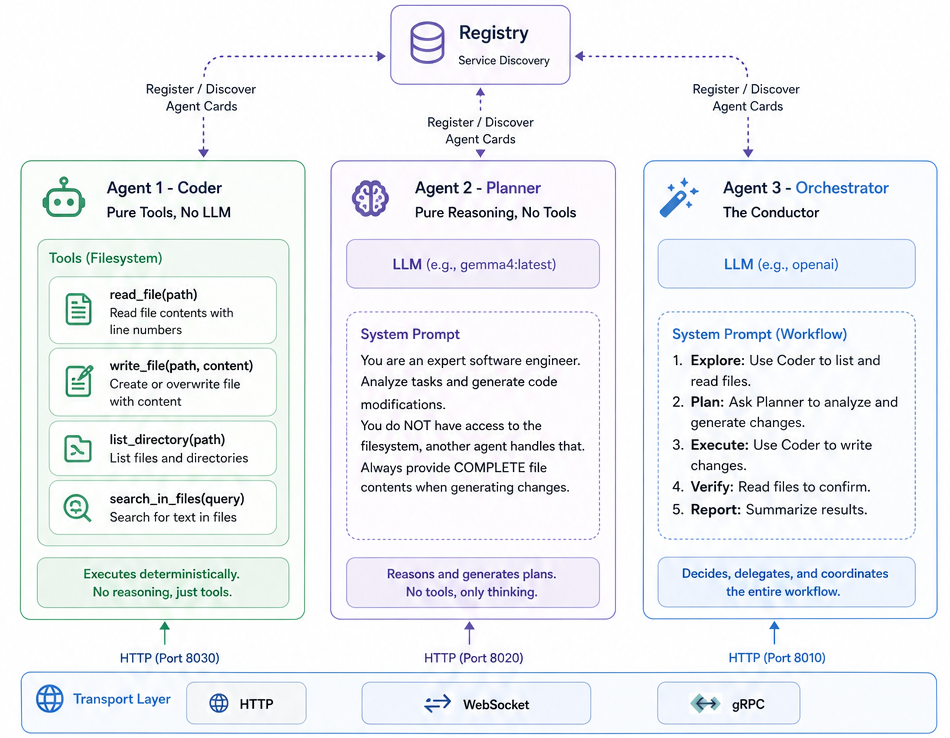
Agent 1 - The Coder: Pure Tools, No LLM
The Coder is the workhorse. It exposes four filesystem tools but has no LLM, therefore, it doesn’t think, it executes. Deterministically. Reliably.
from protolink.agents import Agent

agent = Agent(
    card={
        "name": "coder",
        "description": "File system operations agent. Reads, writes, lists, and searches files.",
        "url": "http://localhost:8030",
    },
    transport="http",
    registry=registry,
    # Notice: no `llm` parameter. This agent is a pure tool worker.
)
Turn any Python function into a discoverable, network-callable tool with a single decorator:
@agent.tool(
    name="read_file",
    description="Read the contents of a file. Returns content with line numbers.",
    input_schema={"path": str},
)
def read_file(path: str) -> dict:
    with open(safe_path(path)) as f:
        lines = f.readlines()
    return {
        "content": "".join(f"{i+1:4d} | {line}" for i, line in enumerate(lines)),
        "line_count": len(lines),
    }

@agent.tool(
    name="write_file",
    description="Write content to a file. Creates or overwrites.",
    input_schema={"path": str, "content": str},
)
def write_file(path: str, content: str) -> dict:
    with open(safe_path(path), "w") as f:
        f.write(content)
    return {"success": True, "message": f"Wrote to {path}"}
When the Orchestrator sends agent_call → coder.read_file(path="utils.py"), Protolink routes the HTTP request, executes the function, and returns the result. The Coder never has to understand why it's reading a file, that's someone else's job.
We also define list_directory and search_in_files tools the same way, giving the mesh full filesystem awareness.
Agent 2 - The Planner: Pure Reasoning, No Tools
The Planner is the opposite of the Coder: it has an LLM but no tools. It can’t read or write files. It can only think.
from protolink.agents import Agent
from protolink.llms.server import OllamaLLM

# One-liner LLM creation. Swap providers by changing the string.
llm = OllamaLLM("gemma4:latest") # or "anthropic", "openai", "gemini"..
PLANNER_SYSTEM_PROMPT = """You are an expert software engineer.
Your role is to ANALYZE coding tasks and GENERATE precise code modifications.
You do NOT have access to the filesystem, another agent handles that.
Always provide COMPLETE file contents when generating changes."""
agent = Agent(
    card={
        "name": "planner",
        "description": "Expert code planner. Analyzes tasks and generates code changes.",
        "url": "http://localhost:8020",
    },
    transport="http",
    registry=registry,
    llm=llm,
    system_prompt=PLANNER_SYSTEM_PROMPT,
    # Notice: NO tools. This agent only reasons.
)
When the Orchestrator calls agent_call → planner.infer("Here's utils.py, add type hints..."), Protolink routes the prompt to the Planner's LLM, gets the response, and returns it. This is LLM-to-LLM delegation, using the infer action in Protolink's protocol.
The Planner can use a different (more powerful, more expensive) model than the Orchestrator. In production, you might run the Planner on GPT-4o for deep reasoning while the Orchestrator uses a cheaper model just for coordination. With Protolink, this is a one-line configuration change.
Agent 3 - The Orchestrator: The Conductor
The Orchestrator ties everything together. It has an LLM for decision-making and uses agent_call to delegate to the Planner and Coder.
from protolink.agents import Agent
from protolink.llms.server import OllamaLLM

ORCHESTRATOR_SYSTEM_PROMPT = """You are an AI coding assistant coordinator.
Your job is to help users modify code by coordinating specialist agents.
YOUR WORKFLOW:
1. Explore: Use the Coder agent to list files and read relevant code.
2. Plan: Ask the Planner agent to analyze and generate changes.
3. Execute: Use the Coder to write the changes.
4. Verify: Read modified files to confirm changes.
5. Report: Summarize what was done."""
agent = Agent(
    card={
        "name": "orchestrator",
        "description": "AI coding assistant coordinator.",
        "url": "http://localhost:8010",
    },
    transport="http",
    registry=registry,
    llm=OllamaLLM(),
    system_prompt=ORCHESTRATOR_SYSTEM_PROMPT,
)
The Orchestrator’s LLM reads this prompt plus the discovered agent cards from the Registry, and autonomously decides which agent to call, in what order, with what arguments. We don’t hard-code any workflow, but rather, the LLM figures it out.
It’s worth noting that you can use any LLM provider and model for each different agent.
The Magic: The agent_call Inference Loop
Here’s what makes this truly autonomous. To kick things off, we use two core primitives:
- Task: The universal data container in A2A and Protolink. It carries the entire history of messages and artifacts as it moves through the mesh. So basically the agents send and receive Tasks with each other.
- AgentClient: The agent network client (entry point). It handles the low-level communication (HTTP/WebSockets) to send a Task to an agent and wait for a result.
Under the hood, a Task is just a standard JSON payload. This isn’t “magic Python communication.” It’s a language-agnostic data contract. This means a Python agent could seamlessly delegate work to an agent written in Node.js, Go, or Rust, as long as they speak the same A2A protocol.
When you send a single task to the Orchestrator:
from protolink.client import AgentClient
from protolink.models import Task

task = Task.create_infer(prompt="Add type hints and docstrings to utils.py")
result = await client.send_task(agent_url="http://localhost:8010", task=task)
print(result.get_last_part_content())
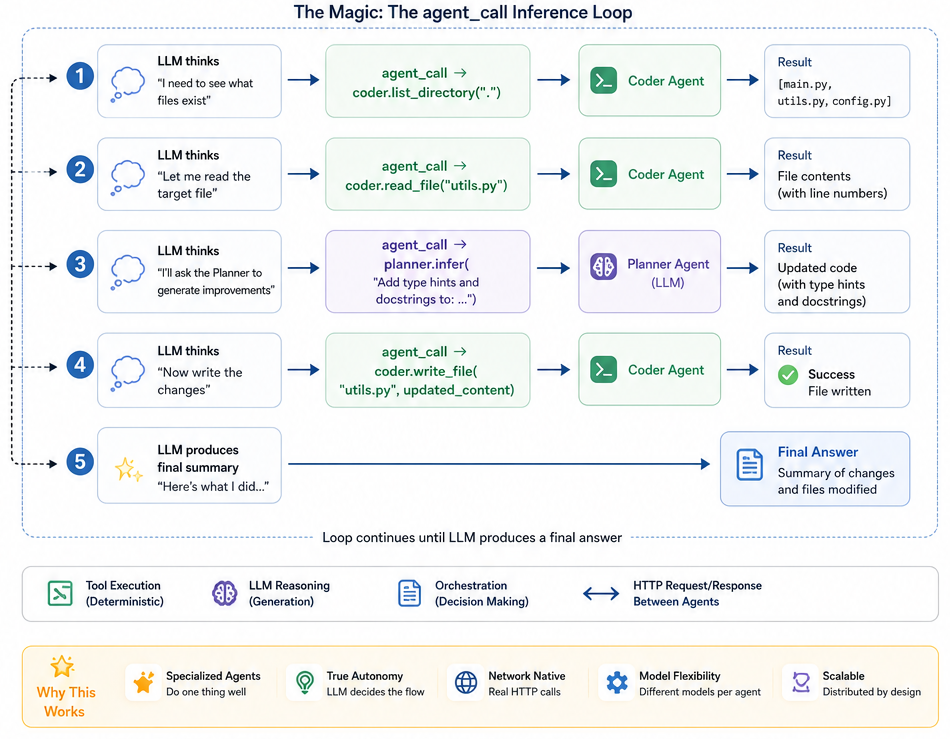
Protolink enters a non-deterministic inference loop that runs until the LLM produces a final answer:
Step 1: LLM thinks → "I need to see what files exist"
        → agent_call → coder.list_directory(".") → [main.py, utils.py, config.py]
Step 2: LLM thinks → "Let me read the target file"
        → agent_call → coder.read_file("utils.py") → file contents
Step 3: LLM thinks → "I'll ask the Planner to generate the improvements"
        → agent_call → planner.infer("Add type hints and docstrings to: ...")
        → Planner's LLM generates updated code
Step 4: LLM thinks → "Now write the changes"
        → agent_call → coder.write_file("utils.py", updated_content) → ✅
Step 5: LLM produces final summary → Loop ends
Five steps, three agents, two LLMs, zero human intervention. Each agent_call is a real HTTP request, the agents could be on different machines, different clouds, different continents.
Observability: No Black Boxes
Because every agent_call is a standard HTTP request, the entire mesh is transparent. You can log, audit, and inspect every single thought and tool execution in real-time. There are no hidden operations, so, if an agent is thinking or acting, it’s visible on the wire.
Running It
The entire system runs from a single script. A Registry starts first, then each agent registers itself so others can discover it.
# Clone the repo
git clone https://github.com/nMaroulis/protolink
cd protolink/examples/code_assistant
python run.py
# With Ollama (free, local, private)
ollama pull gemma4:latest
LLM_PROVIDER=ollama
# Or with OpenAI
export OPENAI_API_KEY=sk-...
LLM_PROVIDER=openai
# Or with Anthropic
export ANTHROPIC_API_KEY=sk-ant-...
LLM_PROVIDER=anthropic
The script creates a demo workspace with sample Python files, starts all agents, and lets you interact:
🤖 CODE ASSISTANT - Protolink Multi-Agent Coding System
======================================================================
📂 Setting up demo workspace...
📡 Starting Registry...
🔧 Starting Coder Agent (tools-only, no LLM)...
🧠 Starting Planner Agent (LLM: openai)...
🎯 Starting Orchestrator Agent (LLM: openai)...

🔍 Discovered 3 agents:
   • coder (Tools): ['read_file', 'write_file', 'list_directory', 'search_in_files']
   • planner (LLM): reasoning
   • orchestrator (LLM): reasoning

💬 > Add type hints and docstrings to utils.py

   📁 [coder] list_directory: .
   📖 [coder] read_file: utils.py
   🧠 [planner] infer: analyzing and generating changes...
   ✍️  [coder] write_file: utils.py → Wrote 76 lines

✅ Added type hints and PEP 257 docstrings to all 6 functions in utils.py.
You can watch the delegation chain in real-time as HTTP requests fly between agents.
What This Showcases vs. the Vacation Example
In the previous post, we demonstrated the fundamentals. This example goes deeper:
| Feature | Vacation Booking | Code Assistant |
|---------|-----------------|----------------|
| Agent types | LLM + Tool agents | LLM-only + Tool-only + Hybrid |
| `agent_call` modes | Mostly `tool_call` | Both `infer` *and* `tool_call` |
| LLM-to-LLM delegation | One reasoning agent | Orchestrator → Planner (LLM-to-LLM chain) |
| Multi-step reasoning | 3-step pipeline | 5+ step autonomous loop |
| Side effects | Hotels & weather | Real filesystem modifications |
| Safety | N/A | Workspace sandboxing |
The most important new concept is LLM-to-LLM delegation (infer). In the vacation example, the Coordinator mostly called tools. Here, the Orchestrator asks the Planner's LLM to think, passing code context and getting generated improvements back. This is a fundamentally different kind of collaboration: two LLMs working together, each with its own system prompt and specialization.
The Bigger Picture
This example is a toy, but the architecture is not. Consider what happens when you add agents:
- A Reviewer Agent (LLM-only) that reviews code changes before they’re written
- A Test Runner Agent (tool-only) that runs pytest after every edit
- A Git Agent (tool-only) that commits changes and creates pull requests
- A Documentation Agent (LLM-only) that generates README updates
Each new agent plugs into the mesh by registering with the Registry. The Orchestrator discovers them automatically and starts using them with no code changes required.
That’s the power of a protocol-driven, decentralized agent mesh. Agents are not functions to be called. They are autonomous entities that communicate, discover, and collaborate.
Key Takeaways
- Separation of Concerns: The brain (Planner) doesn’t touch files. The hands (Coder) don’t hallucinate. The coordinator (Orchestrator) doesn’t do either, it delegates.
- Two Delegation Modes: infer for LLM-to-LLM reasoning, tool_call for deterministic execution. Protolink supports both through the same agent_call protocol.
- LLM-Agnostic: One line changes the model. create_llm("openai") → create_llm("anthropic") → create_llm("ollama"). Your agents don't care.
- Dynamic Discovery: Agents register with a Registry and find each other at runtime. Add or remove agents without touching code.
- Autonomous Orchestration: Send one task, get the final result. The LLM decides the workflow autonomously through the inference loop.
Get Started
The complete code is in the examples/code_assistant directory.
pip install protolink
Check out Protolink on GitHub and start building your own agent mesh today.

This is Part 2 in the Protolink series. Part 1 covers building a Vacation Booking system with the same framework.
Build Easily Your Own “Claude Code” with Three Agents: Brain, Hands, and Coordinator was originally published in Level Up Coding on Medium, where people are continuing the conversation by highlighting and responding to this story.