I couldn’t get production-quality results from Claude Code’s built-in coding agent. So I built a system of specialized agents, structured workflows, and task management that turns it into an engineering team.
For months, I tried using Claude Code the way many developers do: describe a problem, let it generate code, review, and ship. And for months, the results were the same kind of wrong. The code compiled. Tests passed. But the feature duplicated a service that already existed in the codebase. Or it ignored a versioning strategy I’d established three sessions ago. Or it solved one use case when the problem required three, and I wouldn’t realize it until days later when I tried to extend the design.
These weren’t one-off failures. They were the predictable outcome of treating an LLM as a solo developer with no memory, no architectural awareness, and no paper trail. I could fix any individual mistake with a follow-up prompt, but I couldn’t fix the pattern. Every feature over a certain complexity hit the same wall: the model didn’t know what I’d already decided, couldn’t see what the codebase already had, and left no record of why it made the choices it did.
Ultimately, I had to accept that vibe coding couldn’t get me far enough, so I started building a Vibe Engineering system.
Three Problems Vibe Coding Can’t Solve
The AI coding conversation obsesses over generation speed. Wrong focus. After months of building production software with Claude Code, the hard problems fall into three categories that no amount of prompt tweaking addresses.
Alignment. When you ask an LLM to write code, you’re betting that what’s in your head matches what the model generates. Small tasks, decent odds. A 20-task feature spanning five phases and 65 story points? Without alignment artifacts, you’re guaranteed rework. I’ve watched it happen on my own projects: Claude produces architecturally sound code that solves the wrong problem because we never agreed on the right problem.
Context persistence. An LLM’s context window is a conversation, but software applications are complex organisms with capabilities, opinions, symbiotic relationships, and most importantly: history. The discovery document you wrote on Monday needs to inform the task an agent implements on Thursday, in a different session, with a potentially different model. Conversation memory doesn’t survive that gap, and MCP memory servers only present what the agent searches for.
Audit trail. When AI generates code, the “why” evaporates. Why this approach over that one? What tradeoffs were considered? What assumptions were made? Without artifacts capturing the decision process, you can’t run retrospectives. You can’t improve your system. You can’t explain your own codebase to a new team member, or to yourself, after a long weekend.
The agent workflow kit I built meticulously addresses each of these problems by building an engineering team from specialized AI agents
The Architecture: Agents as Markdown Personas
The core idea is simple. Instead of using Claude Code as one general-purpose assistant, I define specialized agents as markdown files in ~/.claude/agents/. Each file is a persona with explicit instructions, constraints, output formats, and quality gates. When I invoke an agent, Claude takes on that role with those constraints. The constraints are the feature.
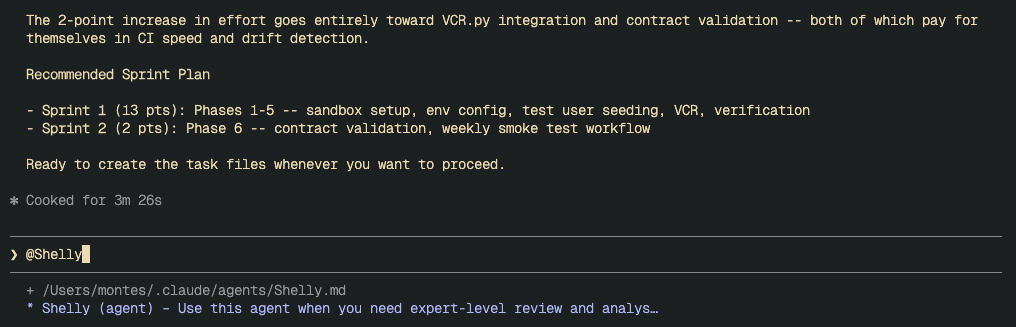
Here’s the mechanism. Claude Code reads markdown files referenced with @ paths in your CLAUDE.md configuration. When you reference a persona file, its contents become part of the model's system context for that session. You can also spawn subagent tasks: separate Claude Code instances that run in parallel with their own tool access but inherit the persona context. The persona file itself is a Markdown document that contains instructions, constraints, and output format requirements. None of this requires plugins or special tooling. It's files on disk, loaded into context.
The agent workflow kit ships six agent persona files: Eco, Norwood, Ive, Zod, Shelly, and Ada. Here’s what each does, and why specialization matters.
Eco: Research
Eco is the research agent. It uses Firecrawl MCP (or falls back to Claude’s built-in web tools) to search the web, scrape pages, crawl sites, and extract structured data, surveying the landscape before any design work begins. It operates on three principles: start wide, then deep; evidence over speculation; and confidence through clarity.
The methodology is structured as follows: a wide survey, a credibility assessment using CRAAP scoring (Currency, Relevance, Authority, Accuracy, Purpose), a deep dive into the most credible findings, and synthesis with confidence-scored conclusions. If confidence falls below a threshold or sources contradict each other, Eco stops and says so rather than guessing.
I use Eco before starting any feature that touches an unfamiliar domain. When I was evaluating CLI frameworks for a new project, Eco surveyed five options (Click, Typer, Rich+Click, prompt_toolkit, Textual), scored each against my requirements, and produced a recommendation with explicit tradeoffs. That took twenty minutes instead of a day of tab-switching.
Norwood: Discovery and Planning
Norwood is the principal engineer who writes the document that makes code worth writing. Its persona is modeled on someone who’s seen enough production disasters to know that the fastest path to shipping is spending time upfront to understand the problem.
Norwood’s output is structured: problem statement, code archaeology (what exists and can be reused), solution architecture with alternatives considered, implementation plan with phase breakdown, risk analysis with probability and mitigation for each risk. It produces Architecture Decision Records. It enforces what I call the “Reuse and Consolidation Mandate,” meaning Norwood must inventory existing components before proposing new ones. No greenfield designs when the codebase already has 80% of what you need.
Norwood has quality gates baked into its persona file:
- The Drunk Test: Could a tired engineer at 2am understand this document well enough to make a correct decision?
- The Future Test: Will this document still make sense in six months?
- The Handoff Test: Could another team implement from this document without asking clarifying questions?
The best part: This subagent protocol has generated dozens of discovery documents in an enterprise software environment, each of which has been scrutinized by multiple talented, experienced, and frankly terrifying principal software engineers and architects. All of that experience has been incorporated back into the protocol.
The key constraint: Norwood doesn’t write code. It writes strategy. That separation matters because the moment an agent starts writing both design documents and implementation code, it optimizes for the code it wants to write rather than the problem it needs to solve.
Ive: UX Design
Ive turns Claude into a UX designer who understands why users abandon flows. It thinks in state machines, user journeys, and error states. It references workflow files for translating product requirements into UX artifacts, documenting user flows, and communicating design decisions.
Ive has concrete quality metrics baked in: WCAG 2.1 AA compliance at 100%, component reuse above 80%, task completion rate above 85%. Process metrics too: first prototype in under two days, handoff time under one day, rework rate under 15%.
Zod: Technical Review

Zod is the principal engineer reviewer. It reads discovery documents, UX flows, and code, then produces a structured verdict: APPROVE, APPROVE WITH CONCERNS, REQUEST CHANGES, or NEEDS DISCUSSION.
Its review protocol is formalized: context acquisition, complexity analysis (scoring each component as Trivial, Moderate, Complex, or Uncertain), and then technical assessment. It identifies critical issues, significant concerns, and opportunities for simplification.
What makes Zod useful is what it’s constrained not to do. Its persona file lists five anti-patterns to avoid in reviews:
- Drive-By Reviews: Surface-level comments without engaging with the design
- Nitpick Floods: Drowning important feedback in style complaints
- Blocker Without Alternative: Saying “this is wrong” without saying what right looks like
- Rewrite Reviews: Proposing a redesign instead of reviewing what’s there
- Assumption Reviews: Critiquing based on requirements the author never stated
These anti-patterns are ones I’ve seen in human code review. Writing them into Zod’s persona means the agent avoids the same traps.
Shelly: Task Generation and Sprint Planning
Shelly is the bridge between design and implementation. It reads an approved discovery document and produces implementation tasks following a strict format: task ID, title, target file path, sprint point estimate on the Fibonacci scale (1, 2, 3, 5, 8), user story, business outcome, and a detailed prompt with prerequisites and acceptance criteria.
Shelly’s estimates are structured, not freeform. Its persona file lists specific complexity indicators to check for: state management that looks simple but requires edge-case handling, API boundaries that need multiple failure modes, and frontend components that share state through a parent. The model doesn’t have 15 years of engineering experience, but it follows a systematic evaluation checklist that catches the same hidden complexity a senior engineer would look for.
The output is a set of markdown files that any developer or AI agent can pick up in a future session and implement without needing the original conversation. Each task is self-contained. Each references the specific discovery document sections that explain the design decisions behind it.
Ada: Implementation and Pair Programming
Ada is the agent who writes the code. Its persona embodies test-driven development, clean architecture, and incremental delivery. Ada writes tests before implementation, follows the Red-Green-Refactor cycle, and commits after each passing test cycle. It’s the agent you invoke in implementation phase, when the discovery document is approved, the tasks are generated, and the actual building begins.
Ada’s constraints keep implementation disciplined: single responsibility per file, files under 500 lines, no features that weren’t explicitly requested. It asks clarifying questions instead of guessing, and it treats test difficulty as a design smell rather than a reason to skip coverage.
Why Specialization Over a Single Prompt
You could put all of this into one massive system prompt, and I did try that. It doesn’t work.
A single prompt that says “first research, then plan, then review, then generate tasks” produces mediocre results at every stage. The model tries to be a researcher, a planner, and a critic simultaneously, which means it hedges its research, softballs its reviews, and generates tasks that recapitulate the discovery document rather than adding implementation details.
Separate personas solve this because each one has permission to be exactly one thing. Norwood can propose bold architectural decisions without worrying about whether the code will be hard to write. Zod can tear apart Norwood’s proposal without worrying about hurting anyone’s feelings or undermining its own earlier work. Shelly can estimate honestly without pressure to match the planning agent’s scope predictions.
This mirrors how good engineering teams work. The architect and the code reviewer aren’t the same person, and the tension between their roles produces better outcomes than either would alone.
The Workflow: Research Through Implementation
The agents run in sequence, and each one’s output feeds the next. Here’s the complete pipeline.
Research. Eco surveys the problem space. If I’m building something that touches an unfamiliar API, an unfamiliar framework, or a pattern I haven’t implemented before, Eco does the homework. Output: a research report with confidence-scored findings and source credibility assessments.
Discovery & Codebase analysis. Norwood writes the discovery document. This is the heaviest artifact in the system: problem statement, architecture, data models, implementation plan with phase breakdown, and risk analysis. Norwood references Eco’s research and the codebase map in Claude’s built-in Explore tool. Output: a discovery document, typically 300–600 lines of structured markdown.
UX review. Ive reviews the discovery document from a user experience perspective. It produces CLI mockups, state machines, user journeys, and a gap analysis. Output: UX artifacts and a list of gaps for Norwood to address.
Technical review. Zod reviews the discovery document (now updated with Ive’s feedback). It scores complexity, identifies issues at three severity levels, and delivers a verdict. Output: a structured review with specific, actionable findings.
Issue resolution. If Zod found critical issues, I send them back to Norwood for resolution. The solutions get written back into the discovery document with section references. Output: an updated discovery document that addresses every critical finding.
Task generation. Shelly reads the approved discovery document and generates implementation tasks. Output: task files following the Task Workflow System format (described below).
Implementation. Ada works through the tasks, writing code using TDD. Each task prompt contains everything needed: target file, objective, prerequisites, acceptance criteria, and references to the discovery sections that explain why. I review Ada’s output, run the quality gates, and move to the next task.
Usage Example: Desktop CUA Autonomous Learning System
In a concrete example from my own work, this pipeline turned a single failure (an agent that couldn’t find a login form) into a fully designed system spanning 20 implementation tasks and 65 story points across five phases.
I needed a way for the computer-use agent I’m building to learn how to use websites or applications, ask me for help if it gets stuck, and then store that memory and recall it for the same or similar applications next time.
The discovery document went through four revisions.
The first revision scoped the feature too narrowly. Claude took my specific example about how the CUA couldn’t find a login link and only scoped out the feature to work with login flows, i.e., it did exactly what I asked it to do but not what I meant.
The second revision expanded scope to three additional user flows which shared the same problem.
The third was the big one, where three questions I raised restructured the entire architecture. If I would‘ve gone straight to code after the first draft, the system I built would have only covered one use case and then required a rewrite to handle the other two.
Then I introduced Ive, for a pass at the UX of the human-in-the-loop component. Ive came back with twelve gaps the discovery had missed. What happens when the user hits Ctrl+C mid-training? How does error recovery work across three different flow types? What’s the partial-save behavior? Norwood, thinking like an architect, hadn’t considered these. Ive, thinking like someone who’d actually use the thing, caught them immediately.
Next came Zod for a technical review of the entire document, which found several critical items that had been missed, as well as redundant and obsolete sections that Ives’ changes superseded.
This is the part where I reviewed the entire document again to ensure that the model and I were on the same page about what we were going to build. On a development team, this is the part where you send the discovery out for feedback.
That feedback may return additional changes that Norwood missed, a new issue that you need Eco to research solutions for, or a reduction in scope or additional implementation phases. You can continue looping through these workflows until the plan is ready for implementation.
Key takeaway: The discovery phase isn’t overhead. It’s where you find out your assumptions are wrong while the sin of being wrong is still venial.
The Task Workflow System
The workflow produces great artifacts, but artifacts without a tracking system become stale documents in a forgotten directory. The Task Workflow System keeps implementation on track across sessions, days, and weeks.
It lives in ~/.claude/knowledge/workflows/tasks-workflow.md and defines a structure for distributing, tracking, and completing implementation tasks. Tasks use Fibonacci-scaled story points (1, 2, 3, 5, 8), and the system tracks velocity so estimates improve over time.
Structure
An index file (tasks/tasks-index.md) tracks overall project status: total tasks, pending count, completed count, total story points, points completed. It maps task ID ranges to specific task files.
Task files (tasks/tasks-N.md) hold the actual tasks, with a maximum of 10 tasks per file and a 500-line limit. Each task follows this format:
### Task ID: 006
- **Title**: Evolve PlaybookService with YAML site playbook CRUD
- **File**: src/services/playbook_service.py
- **Complete**: [ ]
- **Sprint Points**: 5
- **User Story**: As a developer, I want the PlaybookService
  to support loading, saving, listing, and deleting structured
  YAML site playbooks, so that the training system can persist
  and retrieve playbook data.
- **Outcome**: CRUD operations for site playbooks, with legacy
  methods deprecated per discovery document Section 17.1.
#### Prompt:
    Objective: Extend PlaybookService with YAML site playbook operations.
    File to modify: src/services/playbook_service.py
    Prerequisites:
    1. Read discovery document Sections 6.4 and 17.1
    2. Check existing PlaybookService for current method signatures
    3. Run `just test` to establish baseline
    Detailed Instructions:
    - Implement load_site(), save_site(), save_flow(),
      list_site_playbooks(), delete_site()
    - Mark legacy markdown methods as deprecated
    - Add schema version checking per Section 12.3
    Acceptance Criteria:
    - [ ] All five CRUD methods implemented and tested
    - [ ] Legacy methods deprecated with warnings
    - [ ] `just all` passes (lint, typecheck, test)
Notice the specificity. The target file is named. The discovery document sections are cited. The acceptance criteria are concrete and testable. The just all quality gate ensures lint, typecheck, and tests pass before a task is marked complete.
Cross-Session Context
When a task is completed, the agent marks it Complete: [x] and updates the index. The index always reflects current progress:
## Overall Project Task Summary
- **Total Tasks**: 20
- **Pending**: 14
- **Complete**: 6
- **Total Points**: 65
- **Points Complete**: 19
Any future session, with any model, can check the index and know exactly where the project stands. No conversation history needed. No memory of what happened last Tuesday. The state is in files.
What This System Does Not Solve
Agents Still Hallucinate.
Norwood can propose an architecture that references a method that doesn’t exist. Explore’s codebase analysis mitigates this (the agent reads actual code before designing), but it’s not foolproof. Human review of every discovery document is non-negotiable. This system adds structure, not infallibility.
Task Estimates are Still Estimates.
A task with Sprint Points: 5 might take 8 points of effort because the prompt underestimated integration complexity. Shelly’s estimates are starting points. The velocity tracking helps calibrate over time, but there’s no magic.
Overkill for Small Changes.
A two-line bug fix doesn’t need a full agent pipeline and a discovery document. My threshold: if it’s more than 8 story points, run the workflow. Under 8, fix it directly. The overhead pays for itself on features, not patches.
Persona Files Require Maintenance.
They drift as you learn what works. After one session where Norwood missed multi-tab browser behavior, I updated its persona to explicitly require multi-tab consideration for any feature involving external URLs. That update happened because I noticed the gap. The retrospective workflow helps, but the system doesn’t self-correct at the persona level yet.
The Agent Workflow Kit
I’ve packaged the agent personas, workflows, and guidelines into a Python CLI that manages the full lifecycle of these knowledge assets.
Prerequisites: Python 3.12+ and pipx (or uv tool install). You'll also need Claude Code CLI installed, since the kit manages files in its ~/.claude/ configuration directory.
agent-workflow-kit ships six agent personas (Norwood for discovery, Eco for research, Ive for UX, Zod for review, Shelly for task generation, Ada for implementation), three workflow definitions (task management, retrospectives, project initialization), guidelines for file optimization and tool usage, and a TDD strategy. Everything described in this article can be installed with a single command.
The CLI handles what manual setup can’t:
agent-kit install              # copies agents, workflows, and guidelines into ~/.claude/
agent-kit status               # Rich table showing installed files and their state
agent-kit update               # pulls upstream improvements, detects your local changes
agent-kit doctor               # validates the whole installation: files, references, manifest
Under the hood, agent-kit install places files into ~/.claude/agents/ and ~/.claude/knowledge/, then creates a manifest (~/.claude/.workflow-kit/manifest.json) tracking every file it manages with SHA-256 checksums. That manifest is what makes cwk update possible: when upstream agent personas improve, the CLI compares checksums to detect whether you've modified your local copy. Unmodified files get updated silently. Modified files trigger a diff view with three options: accept upstream, keep yours, or save the upstream version as .new for manual merge. No blind overwrites.
This matters because agent personas should evolve. After a session where Norwood missed multi-tab browser behavior, I updated its persona. I don’t want that customization destroyed the next time I pull improvements from the repo. The checksum strategy preserves local work while keeping the door open for upstream fixes.
How It Integrates with CLAUDE.md
All of this wires together through Claude Code’s CLAUDE.md configuration files. Your global ~/.claude/CLAUDE.md references the agent personas, the workflows, and the guidelines using @ paths. When Claude Code starts a session, it reads these references and loads the corresponding files as context.
agent-kit install handles this automatically. It injects a managed section into your CLAUDE.md bounded by sentinels:
<!-- agent-kit:begin — managed by agent-workflow-kit, do not edit -->
## Workflow Kit Agents
When performing discovery and planning, use @~/.claude/agents/Norwood.md
When performing research, use @~/.claude/agents/Eco.md
When performing UX design, use @~/.claude/agents/Ive.md
...
## Workflow Kit Knowledge
Review the task workflow system in @~/.claude/knowledge/workflows/tasks-workflow.md
...
<!-- agent-kit:end -->
Everything between those sentinels belongs to the CLI. Your own content above or below the markers stays untouched. When you run agent-kit update, the CLI replaces the managed section with the latest references. When you run agent-kit uninstall, it removes the section cleanly. No manual CLAUDE.md editing required.
If you already have your own @ references outside the managed section, they coexist without conflict. Project-specific overrides still go in each project's own CLAUDE.md.
Start Here
You don’t need to adopt the full system on day one. Start with one practice and expand from there.
You can start by installing the kit:
pipx install agent-workflow-kit
agent-kit install
That gives you the agents, workflows, guidelines, and CLAUDE.md integration. You don’t need to implement the entire workflow I have described on day one; you can start piecemeal, take what works and leave the rest.
Start by writing a discovery document before your next feature. Describe the problem, analyze the existing code, propose the solution, and list the risks. Have Claude help you write it, but review it yourself. This single practice will catch design mistakes before they become code.
Add a reviewer. When you’re comfortable with Norwood Use Zod’s persona to review a technical document or pull request before your own review. Zod can help you catch things you may have missed.
Structure your tasks. When you break a problem into implementation work, ask Shelly to use the task format: specific file paths, explicit acceptance criteria, and references to the discovery or RFC sections that explain the decisions. Self-contained tasks survive session boundaries.
Research a topic. Ask Eco to research a topic for you. If you have an approach to a problem you’re confident in, ask Eco to research alternatives or open source tools to help you solve that problem. I am always impressed by what it comes back with.
The point isn’t the specific agents or the number of workflows. The point is that AI-assisted development at scale requires the same engineering discipline as any other complex system: explicit interfaces, durable artifacts, separation of concerns, and feedback loops.
Vibe coding is fine for prototypes. For production software, build a system.
The kit is at github.com/mandelbro/agent-workflow-kit. Install it, customize it, make it yours.
The agent personas, workflows, and task management system described in this article are actively used across multiple projects, including a vision-based desktop automation framework (Soren) built with UI-TARS and the CUA SDK. All code examples and task structures are drawn from real project artifacts.
Beyond Vibe Coding: Building an Agentic Engineering Team was originally published in Level Up Coding on Medium, where people are continuing the conversation by highlighting and responding to this story.