Background
In this series, I will share what I learned while exploring the Azure Machine Learning platform. If you come from a software engineering background and also want to systematically learn Data Science and MLOps, this series can be a practical place to start.
In this article, let’s see how to run a training job on Azure Machine Learning, and what infrastructure and compute resources are required behind the scenes.

Workspace as the Center
The core resource in Azure Machine Learning is the Workspace. On one hand, it provides an IDE-like environment for development. On the other hand, it acts as the control plane that manages all the resources required to run an ML job.
Like many other Azure services, we can create it through Azure Portal or az CLI:
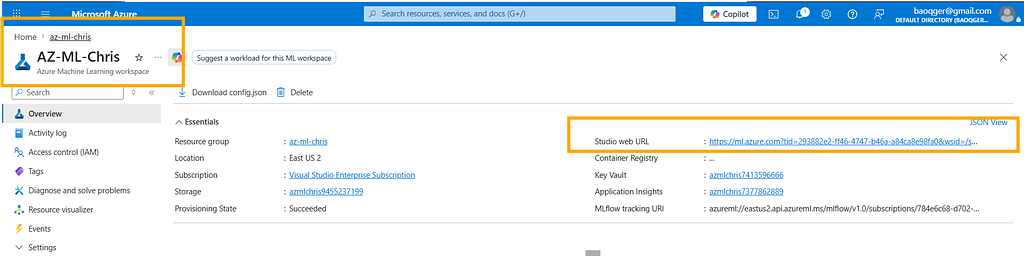
The following code snippet uses the Azure SDK to connect to a workspace and print some of its basic information:
from azure.ai.ml import MLClient
from azure.identity import DefaultAzureCredential, InteractiveBrowserCredential

# authenticate
try:
    credential = DefaultAzureCredential()
    credential.get_token("https://management.azure.com/.default")
except Exception:
    credential = InteractiveBrowserCredential()
SUBSCRIPTION = os.getenv("SUBSCRIPTION")
RESOURCE_GROUP = os.getenv("RESOURCE_GROUP")
WS_NAME = os.getenv("WS_NAME")
# Get a handle to the workspace
ml_client = MLClient(
    credential=credential,
    subscription_id=SUBSCRIPTION,
    resource_group_name=RESOURCE_GROUP,
    workspace_name=WS_NAME,
)
ws = ml_client.workspaces.get(WS_NAME)
print(ws.location, ":", ws.resource_group)
The output looks like this:
eastus2 : az-ml-chris
We can also use Machine Learning Studio to get a full view of the workspace:
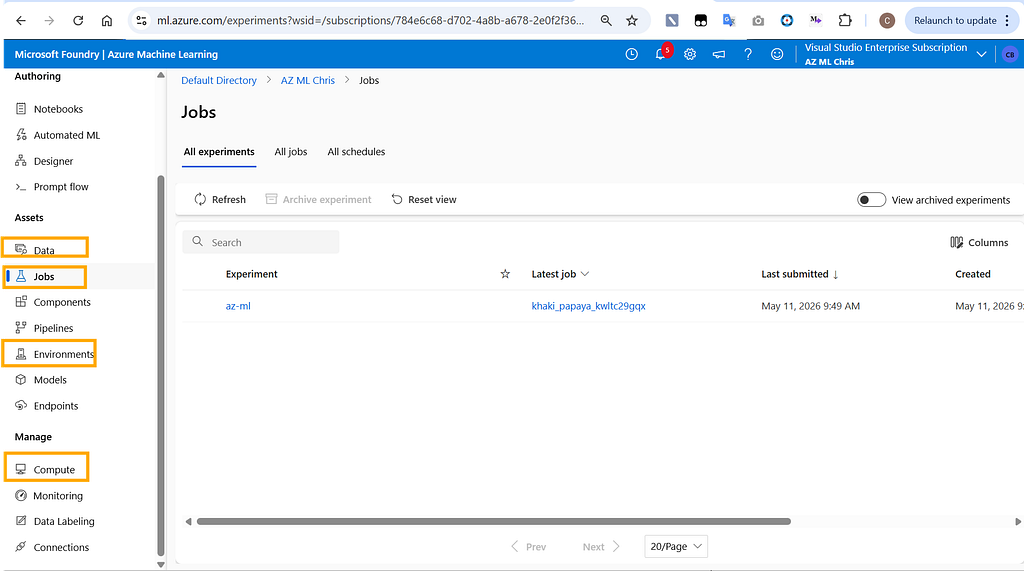
As you can see, a workspace contains many different resources. I will walk through them gradually in later articles. For today, let’s focus on the four most important parts: Compute, Environment, Data, and Jobs. With these four pieces, we can already run a basic ML training task.
Compute
Compute refers to the infrastructure used to train machine learning models. Azure Machine Learning provides several common options:
- Compute instances: a single virtual machine node
- Compute clusters: a cluster made up of multiple virtual machine nodes
- Kubernetes clusters: a Kubernetes-based compute target
- Serverless instances: a serverless option where you do not manage the underlying infrastructure
These are essentially familiar compute patterns from the Azure cloud platform.
For example, the following script creates a compute resource named baoqger1, backed by a VM with the Standard_DS11_v2 size:
from azure.ai.ml.entities import AmlCompute
# Create a compute cluster
cpu_cluster = AmlCompute(
    name="baoqger1",
    type="computeinstance",
    size="Standard_DS11_v2",
    idle_time_before_scale_down=120
)
# Create or update the compute
ml_client.compute.begin_create_or_update(cpu_cluster)
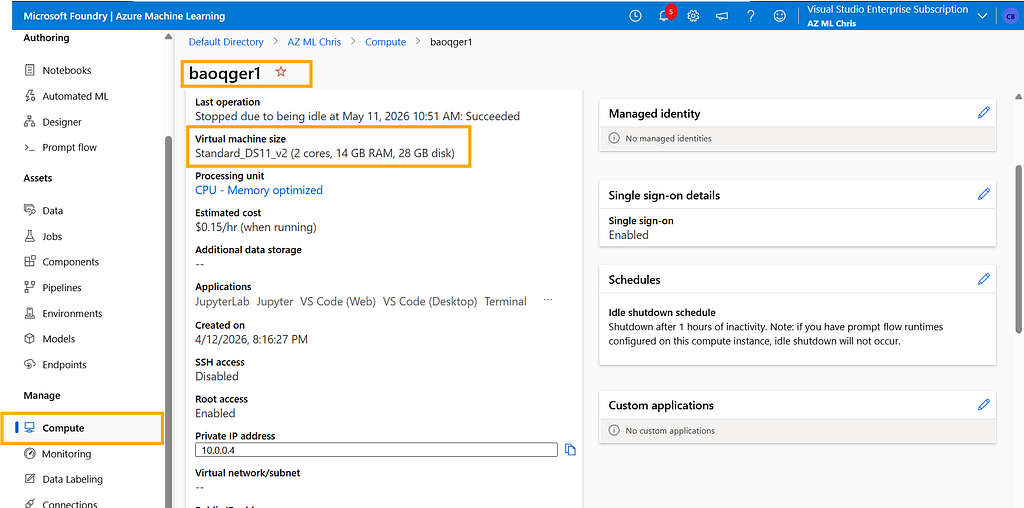
Compute solves the hardware side of the problem. Next step, let's examine the software dependencies, which brings us to the Environment module.
Environment
Environment defines the runtime dependencies required by an ML training job, including the operating system, machine learning frameworks, and the Python version.
To keep development and production environments as consistent as possible, Azure ML uses a containerized approach for Environment. In practice, an Environment maps to a Docker image.
Azure ML provides a set of predefined Environment options, and we can list them with the following script:
envs = ml_client.environments.list()
for env in envs:
    print(env.name)
You will get a list similar to the following:
AzureML-AI-Studio-Development
AzureML-ACPT-pytorch-1.13-py38-cuda11.7-gpu
AzureML-ACPT-pytorch-1.12-py38-cuda11.6-gpu
AzureML-ACPT-pytorch-1.12-py39-cuda11.6-gpu
AzureML-ACPT-pytorch-1.11-py38-cuda11.5-gpu
AzureML-ACPT-pytorch-1.11-py38-cuda11.3-gpu
AzureML-responsibleai-0.21-ubuntu20.04-py38-cpu
AzureML-responsibleai-0.20-ubuntu20.04-py38-cpu
AzureML-tensorflow-2.5-ubuntu20.04-py38-cuda11-gpu
AzureML-tensorflow-2.6-ubuntu20.04-py38-cuda11-gpu
AzureML-tensorflow-2.7-ubuntu20.04-py38-cuda11-gpu
AzureML-sklearn-1.0-ubuntu20.04-py38-cpu
AzureML-pytorch-1.10-ubuntu18.04-py38-cuda11-gpu
AzureML-pytorch-1.9-ubuntu18.04-py37-cuda11-gpu
AzureML-pytorch-1.8-ubuntu18.04-py37-cuda11-gpu
AzureML-sklearn-0.24-ubuntu18.04-py37-cpu
AzureML-lightgbm-3.2-ubuntu18.04-py37-cpu
AzureML-pytorch-1.7-ubuntu18.04-py37-cuda11-gpu
AzureML-tensorflow-2.4-ubuntu18.04-py37-cuda11-gpu
AzureML-Triton
AzureML-Designer-Score
AzureML-VowpalWabbit-8.8.0
AzureML-PyTorch-1.3-CPU
This is only part of the full predefined Environment catalog. You can view the complete list from the Environment page in the Workspace.
From these names, we can see that Azure ML supports popular machine learning frameworks such as PyTorch, TensorFlow, and scikit-learn, as well as different compute architectures like GPU and CPU.
In this article, I will use the AzureML-lightgbm-3.2-ubuntu18.04-py37-cpu environment:
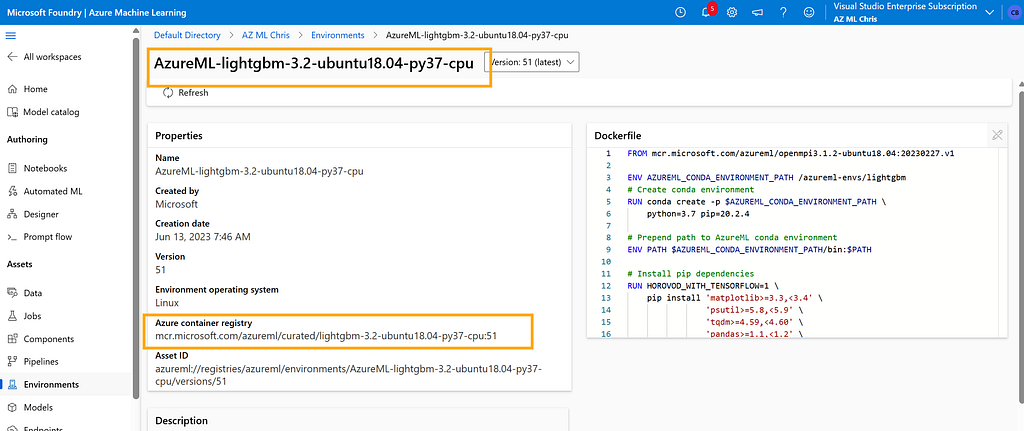
Its underlying Docker image looks like this:
FROM mcr.microsoft.com/azureml/openmpi3.1.2-ubuntu18.04:20230227.v1
ENV AZUREML_CONDA_ENVIRONMENT_PATH /azureml-envs/lightgbm
# Create conda environment
RUN conda create -p $AZUREML_CONDA_ENVIRONMENT_PATH \
    python=3.7 pip=20.2.4
# Prepend path to AzureML conda environment
ENV PATH $AZUREML_CONDA_ENVIRONMENT_PATH/bin:$PATH
# Install pip dependencies
RUN HOROVOD_WITH_TENSORFLOW=1 \
    pip install 'matplotlib>=3.3,<3.4' \
                'psutil>=5.8,<5.9' \
                'tqdm>=4.59,<4.60' \
                'pandas>=1.1,<1.2' \
                'numpy>=1.10,<1.20' \
                'scipy~=1.5.0' \
                'scikit-learn~=0.24.1' \
                'xgboost~=1.4.0' \
                'lightgbm~=3.2.0' \
                'dask~=2021.10.0' \
                'distributed~=2021.10.0' \
                'dask-ml~=2021.10.17' \
                'adlfs~=0.7.0' \
                'ipykernel~=6.0' \
                'debugpy~=1.6.3' \
                'azureml-core==1.51.0' \
                'azureml-defaults==1.51.0' \
                'azureml-mlflow==1.51.0' \
                'azureml-telemetry==1.51.0'
# This is needed for mpi to locate libpython
ENV LD_LIBRARY_PATH $AZUREML_CONDA_ENVIRONMENT_PATH/lib:$LD_LIBRARY_PATH
Data
A machine learning training task always needs data storage. The Workspace provides this capability through Datastores:
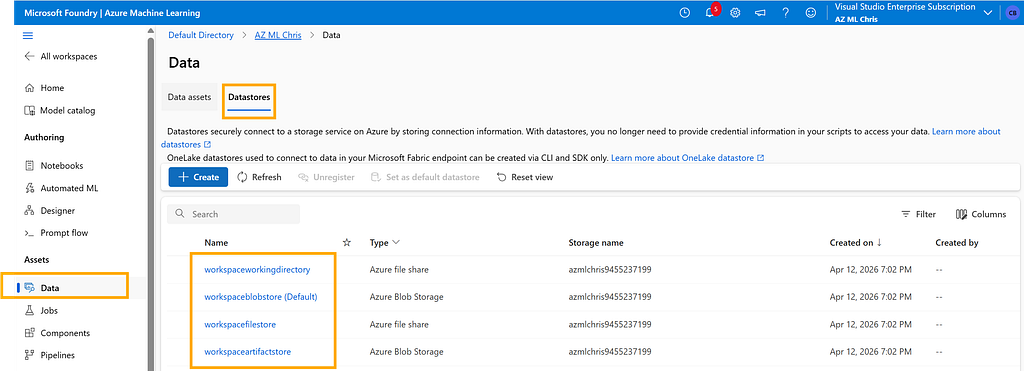
Behind the scenes, Datastores relies on Azure Storage Account. For example, by default it uses an Azure Blob container to store data. From its configuration, we can also see the actual Azure Blob URI it points to.
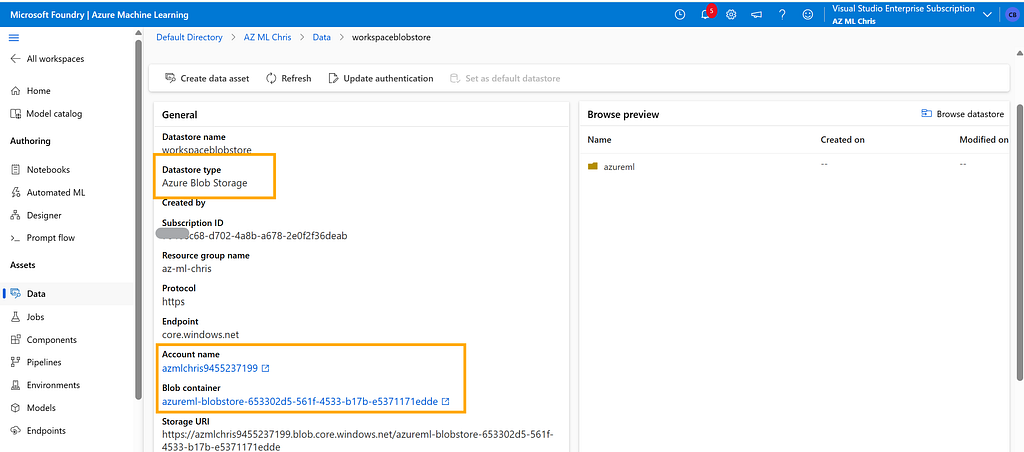
This Azure Storage Account is automatically created when the ML workspace is created. Smart design, right?
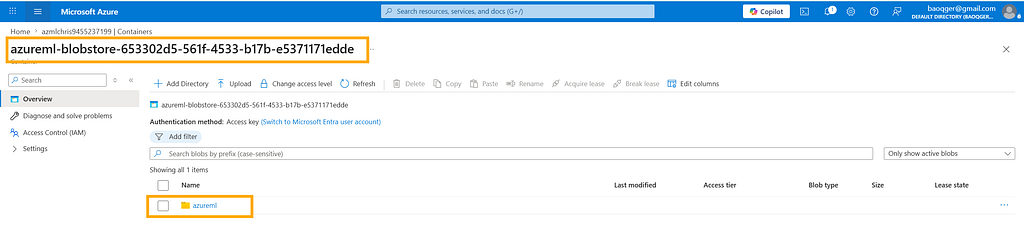
Great, now the basic resources required for training are ready. In the next section, let’s see how to start a machine learning training job with these building blocks.
Training Job
The Azure SDK provides a command method to submit a training job. This method packages several key pieces of information we discussed above:
- environment: uses the AzureML-lightgbm-3.2-ubuntu18.04-py37-cpu@latest image
- compute: uses the compute resource named baoqger1 that we created earlier
from azure.ai.ml import command, Input
# define the command
command_job = command(
    code="./iris/src",
    command="python main.py --iris-csv ${{inputs.iris_csv}} --learning-rate ${{inputs.learning_rate}} --boosting ${{inputs.boosting}}",
    environment="AzureML-lightgbm-3.2-ubuntu18.04-py37-cpu@latest",
    inputs={
        "iris_csv": Input(
            type="uri_file",
            path="https://azuremlexamples.blob.core.windows.net/datasets/iris.csv",
        ),
        "learning_rate": 0.9,
        "boosting": "gbdt",
    },
    compute="baoqger1",
)
There are two more important points here. First, the training dataset is the well-known open-source iris dataset. Second, the training script main.py will also be uploaded from the local machine into the workspace together with the job submission.
# imports
import os
import mlflow
import argparse
import pandas as pd
import lightgbm as lgbm
import matplotlib.pyplot as plt
from sklearn.metrics import log_loss, accuracy_score
from sklearn.preprocessing import LabelEncoder
from sklearn.model_selection import train_test_split
# define functions
def main(args):
    # enable auto logging
    mlflow.autolog()
    # setup parameters
    num_boost_round = args.num_boost_round
    params = {
        "objective": "multiclass",
        "num_class": 3,
        "boosting": args.boosting,
        "num_iterations": args.num_iterations,
        "num_leaves": args.num_leaves,
        "num_threads": args.num_threads,
        "learning_rate": args.learning_rate,
        "metric": args.metric,
        "seed": args.seed,
        "verbose": args.verbose,
    }
    # read in data
    df = pd.read_csv(args.iris_csv)
    # process data
    X_train, X_test, y_train, y_test, enc = process_data(df)
    # train model
    model = train_model(params, num_boost_round, X_train, X_test, y_train, y_test)

def process_data(df):
    # split dataframe into X and y
    X = df.drop(["species"], axis=1)
    y = df["species"]
    # encode label
    enc = LabelEncoder()
    y = enc.fit_transform(y)
    # train/test split
    X_train, X_test, y_train, y_test = train_test_split(
        X, y, test_size=0.2, random_state=42
    )
    # return splits and encoder
    return X_train, X_test, y_train, y_test, enc

def train_model(params, num_boost_round, X_train, X_test, y_train, y_test):
    # create lightgbm datasets
    train_data = lgbm.Dataset(X_train, label=y_train)
    test_data = lgbm.Dataset(X_test, label=y_test)
    # train model
    model = lgbm.train(
        params,
        train_data,
        num_boost_round=num_boost_round,
        valid_sets=[test_data],
        valid_names=["test"],
    )
    # return model
    return model

def parse_args():
    # setup arg parser
    parser = argparse.ArgumentParser()
    # add arguments
    parser.add_argument("--iris-csv", type=str)
    parser.add_argument("--num-boost-round", type=int, default=10)
    parser.add_argument("--boosting", type=str, default="gbdt")
    parser.add_argument("--num-iterations", type=int, default=16)
    parser.add_argument("--num-leaves", type=int, default=31)
    parser.add_argument("--num-threads", type=int, default=0)
    parser.add_argument("--learning-rate", type=float, default=0.1)
    parser.add_argument("--metric", type=str, default="multi_logloss")
    parser.add_argument("--seed", type=int, default=42)
    parser.add_argument("--verbose", type=int, default=0)
    # parse args
    args = parser.parse_args()
    # return args
    return args

# run script
if __name__ == "__main__":
    # parse args
    args = parse_args()
    # run main function
    main(args)
Inside the Workspace, you can find the submitted job here:
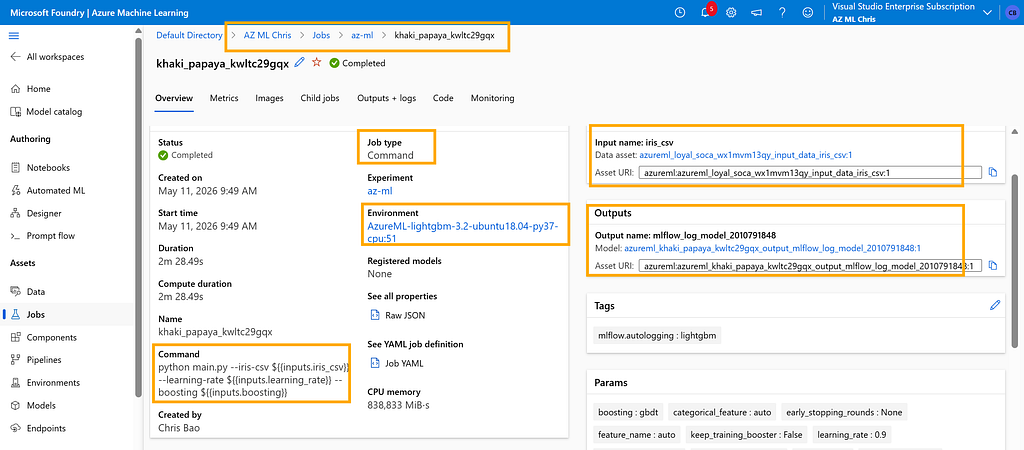
In this article, we walked through the minimum set of infrastructure required to run a training job in Azure Machine Learning: Workspace, Compute, Environment, Data, and the submitted Job itself. After reading this post, you should have a clearer mental model of how these pieces fit together.
I will share more details about training jobs in upcoming articles, including how job execution works internally and how to manage experiments more effectively.
I am Chris Bao, a Microsoft Certified Trainer focused on the Azure AI platform. I work on Azure AI services and agent development, and I provide training and consulting for both teams and individuals.
For collaboration, feel free to contact me: [email protected]
Azure Machine Learning 101 — How a Training Job Actually Runs was originally published in Level Up Coding on Medium, where people are continuing the conversation by highlighting and responding to this story.