Apache Spark is an open source, unified computing engine and a set of libraries for parallel data processing on computer clusters. It is a distributed data processing engine not a storage system that processes data in memory (RAM), making it significantly faster than traditional MapReduce. Spark can run on various storage systems including HDFS, S3/ADLS/GCS, and local files.
It supports multiple programming languages (Python, Java, Scala, and R) and offers simple, developer friendly APIs across Python, Scala, and SQL, along with libraries for diverse tasks ranging from SQL to streaming and machine learning. You can run Spark on your local machine or scale up to thousands of computers, making it suitable for big data processing.
I have created a full series of blogs where I cover all the concepts and techniques I use to become a Spark expert. Check out the full list here Apache Spark Learning Hub: Beginner to Expert
Spark Main Architecture:
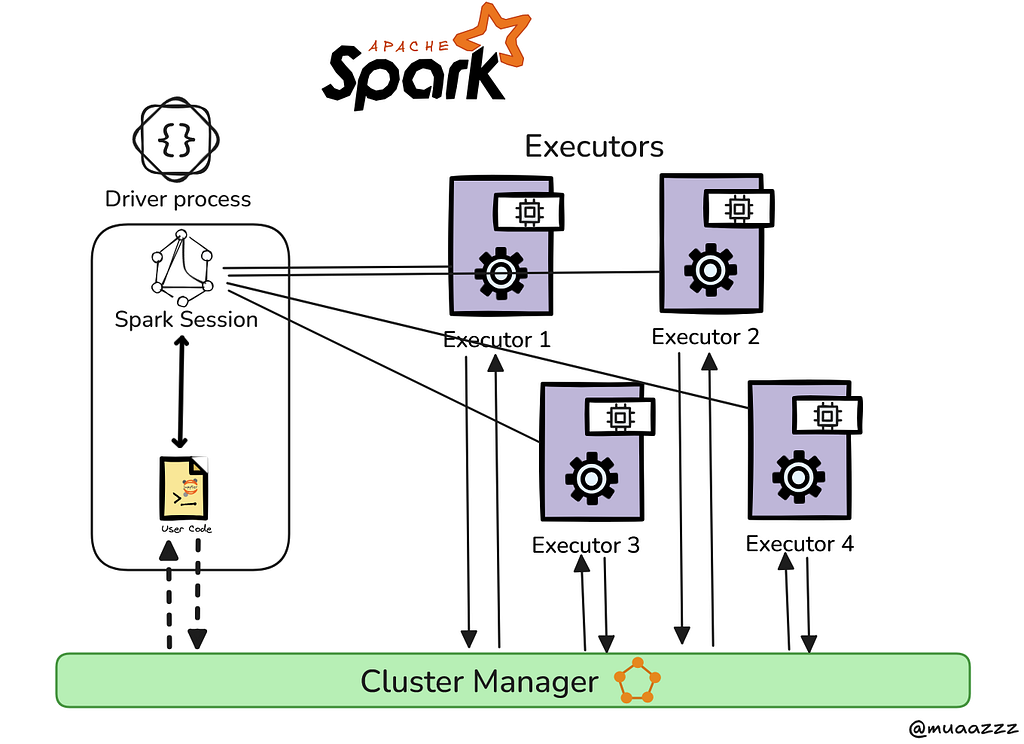
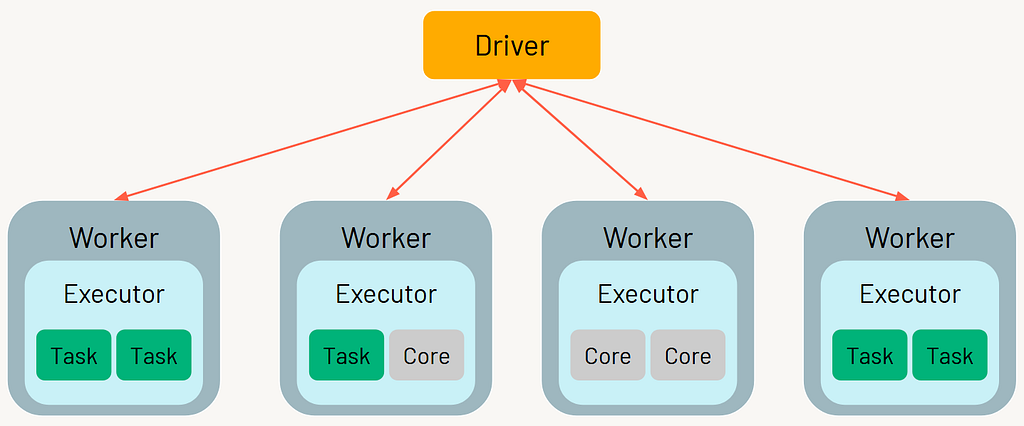
Spark architecture depends mainly on 2 components Driver and Executor
Driver Role: The Spark driver acts like a manager in a distributed system. It is responsible for orchestrating the execution of a Spark application. It takes the user’s code, builds an execution plan, divides it into tasks, schedules them across executors, coordinates their execution, and collects the final results. Unlike executors, the driver does not perform the actual data processing tasks.
Executor Role :Executors are the worker nodes in a Spark application responsible for executing tasks assigned by the Spark Driver. They run across the cluster and handle data processing in parallel using the CPU and memory resources allocated to them. Each executor can run multiple tasks simultaneously, enabling efficient distributed computation.
We can think of this using an analogy of a manager and employees. The manager receives assignments from upper management, like a CEO, but does not execute the work directly. Instead, the manager designs the workflow, divides it into smaller tasks, and assigns those tasks to employees for efficient execution. Once the work is completed, the employees report back to the manager with the results.
Apache Spark has ONE execution engine, but multiple APIs / libraries built on top of it.
Think of it like this:
Spark Core = Engine
Everything else = ways to talk to the engine
Transformation vs Actions
Transformations: Transformations are operations that define a new DataFrame or RDD from an existing one without triggering execution; they are lazy in nature, meaning Spark only builds a logical plan instead of computing immediately, and they do not create a job but simply modify the DAG (Directed Acyclic Graph).
In Spark, transformations are of two types: narrow and wide. Narrow transformations are simple because data from one partition is used to create a single corresponding partition in the next RDD, so no data movement across the network is required. In contrast, wide transformations involve data from multiple partitions being redistributed across the cluster, where each partition in the new RDD may receive data from many partitions of the previous RDD.
df2 = df.filter(df.age > 30) # filter → transformation
df3 = df2.select("name", "age") # select → transformation
df4 = df3.withColumn("age2", df3.age * 2) # withColumn → transformation
Actions: Actions are operations that trigger Spark to execute a DataFrame or RDD and produce a result, either returned to the driver or written to external storage; they initiate a job by causing Spark to break the DAG into stages and tasks for execution, and the key idea is that any operation producing a result outside the DAG is considered an action.
df.show() # action → triggers computation
df.collect() # action → triggers computation and returns all rows
df.count() # action → triggers computation and returns a number
df.write.parquet("path") # writing → action
In Spark, “materialize” simply means actually computing the data and storing it in memory (or disk) instead of just planning the steps.
Discuss about Jobs, Stages and Tasks
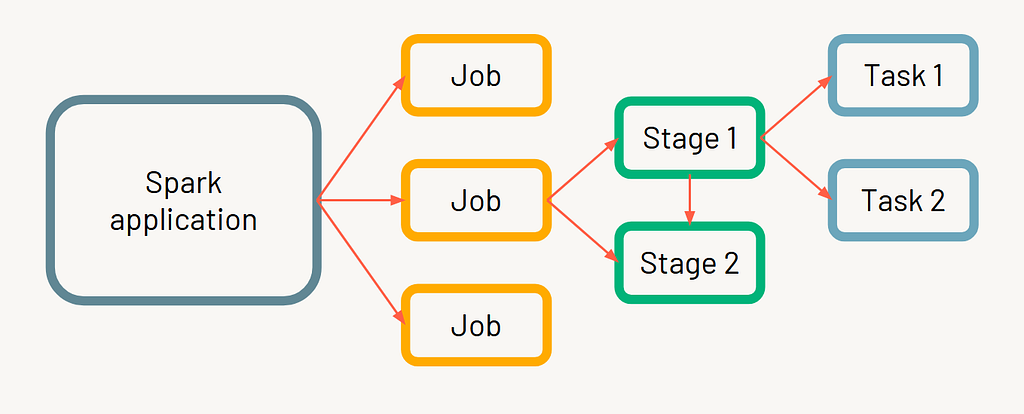
In Spark, an action triggers one or more transformations. When an action runs, it creates a job, which is divided into one or more stages, and each stage contains multiple tasks. Tasks are the only units that actually interact with the hardware, while everything else (jobs, stages, transformations) exists to orchestrate and coordinate task execution. Typically, one partition equals one task, which uses one slot.
Each action in Spark creates a job, and within that job, Spark divides the work into stages; a new stage is created whenever a wide transformation (shuffle) occurs in the DAG.
What is a partition?
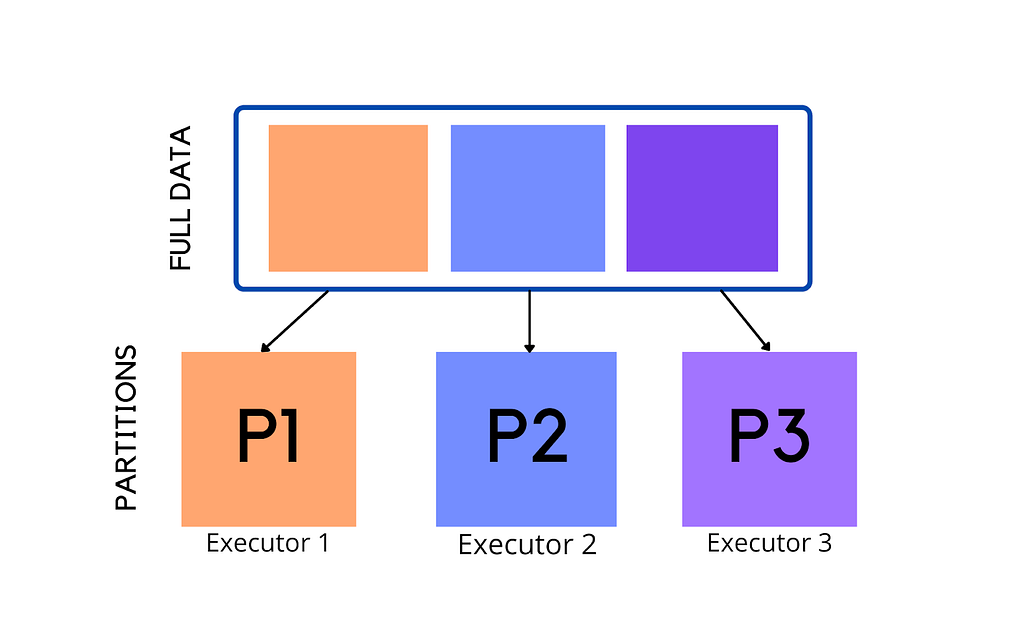
Because Spark is a distributed engine, it splits data into partitions so that each chunk can be sent to different machines for processing, rather than sending one large file. A partition is a part of your dataset that can be processed independently and in parallel. You can think of it like dividing a large CSV file into smaller pieces, with each partition being processed by a single task when a stage runs.
The number of partitions depends on the size of your data. A common guideline is that one partition is around 128 MB in size. For example, if you have 1024 MB of data, it may be divided into 8 partitions, and each partition will be processed as a separate task.
The number of partitions also depends on how you load your data. For example, if you create a DataFrame from a list or dictionary, Spark will create partitions differently compared to when you load data from a file. When reading from files, partitions are often based on how the data is split (like file blocks), while in in-memory data (like lists), Spark decides partitions based on parallelism settings. In some cases, partitions are also influenced by cluster configuration and default settings, making it a combination of data source, environment, and Spark configuration.
Partitions are not created randomly they are determined when a Spark job is planned and executed, not just when data is initially loaded.
Sometimes, partitions can be uneven, where one partition has much more data than others. This is called data skew, and it can slow down your job because one task takes much longer than the rest.
A common rule in production is to keep the number of partitions around 2 to 4 times the total number of CPU cores, which helps achieve good parallelism.
What are RDDs
RDDs (Resilient Distributed Datasets) are the fundamental data abstraction in Spark. They represent data that is distributed across multiple nodes in the cluster and can be processed in parallel.
RDDs were the first API introduced in Spark and provide a low level way to work with distributed data.
In simple RDDs represent distributed data split into partitions and processed in parallel across a cluster.
Role of DAG and Lineage in Spark
One of the biggest innovations that sets Apache Spark apart from traditional systems like Hadoop MapReduce is how it models computation. Instead of following a rigid pipeline like Map → Shuffle → Reduce, Spark builds a more flexible execution plan using a Directed Acyclic Graph (DAG), which represents a sequence of operations and their dependencies, allowing more flexible and optimized execution.
When you write transformations (like filter, select, etc.), Spark does not execute them immediately. Instead, it records them as lineage, which is simply a logical history of all the operations applied to the data. Lineage describes what to do, but not how it will run. It keeps track of how data is derived step by step, which enables Spark to recompute lost data in case of failures.
The DAG comes into play when an action (like count() or collect()) is triggered. At that point, Spark converts the lineage into a DAG, which is a physical execution plan showing how tasks are connected and how data will flow across stages. The DAG is then analyzed by the DAG Scheduler, which divides it into stages based on shuffle boundaries and further into tasks that run on executors.
In simple terms:
- Lineage = logical plan (what transformations were applied and in what order)
- DAG = execution plan built from lineage when an action is called (how those transformations will actually run in the cluster)
In short, Lineage is the history, and DAG is the execution strategy built from that history.
Once the DAG is created, the DAG Scheduler divides it into stages based on shuffle boundaries and sends tasks to executors for execution.
I observed that repeatedly transforming a DataFrame in Spark rapidly grows its lineage, which slows down DAG planning and overall performance, and that checkpointing effectively breaks the lineage, creating a stable snapshot that optimizes subsequent transformations, making it crucial for long ETL pipelines and streaming workloads.
Why Lazy Evaluation in Spark?
Lazy evaluation means Spark does not execute operations immediately it waits until an action is called. Instead of running each step right away, Spark first builds a plan of what needs to be done.
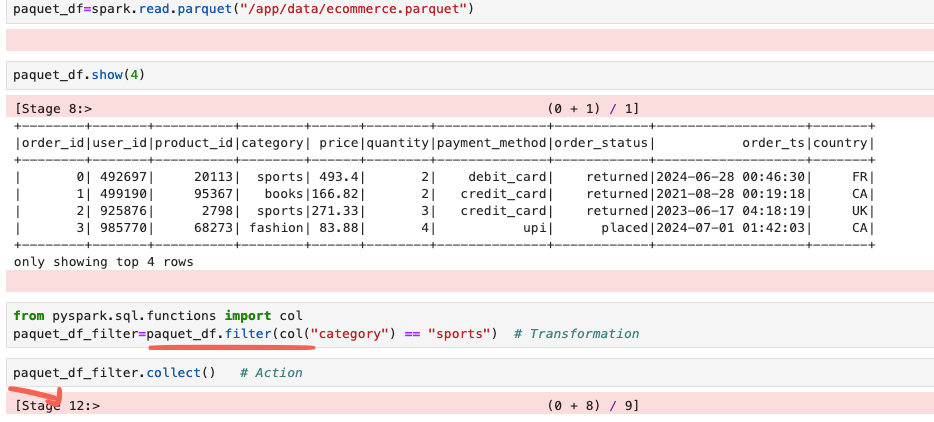
For example, if you apply a filter on a dataset, Spark does not instantly process the data. It simply records that a filter operation needs to be applied. The actual computation only happens when you run an action like count() or collect(). At that point, Spark executes all the steps together in an optimized way.
This approach helps Spark run jobs more efficiently by combining operations and avoiding unnecessary work.
Why Spark Recomputes for Every Action
In Spark, every action (like count() or collect()) starts computation from the original data source. Spark does not change or store the result of transformations by default.
df1 = df.filter(df.age > 18)   # transformation
df1.count()                   # action

df2 = df1.select("name")      # transformation
df2.collect()                 # action
At first, when df1.count() runs, Spark builds a DAG like:
df → filter → count
and executes it.
Now, when df2.collect() runs, Spark does not reuse the result of df1. Instead, it builds a new DAG:
df → filter → select → collect
This means Spark goes back to the original DataFrame, reapplies the filter (recomputing df1), then applies the select transformation, and finally executes the action.
This happens because Spark does not store intermediate results by default. It relies on the DAG (lineage) to recompute data whenever needed, which helps with fault tolerance and flexibility.
Shuffling in Spark
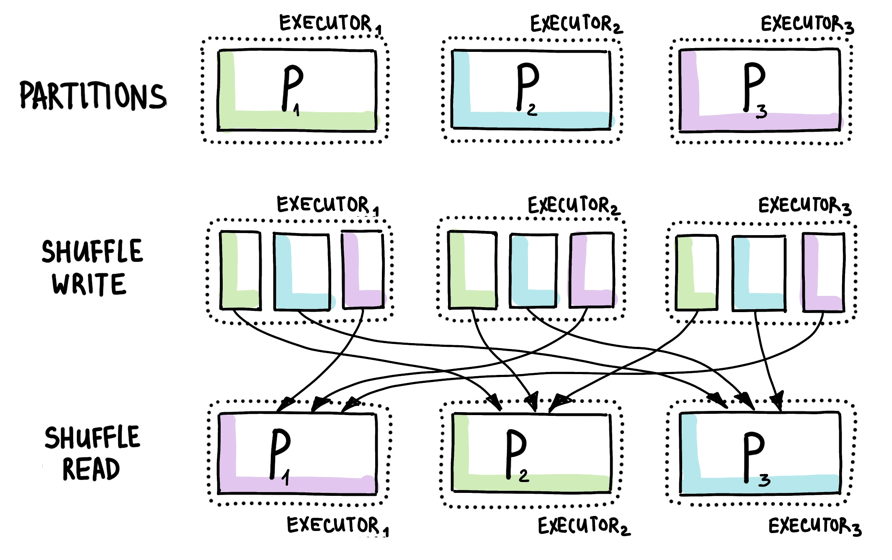
Shuffling in Spark is the process of redistributing data across different partitions in the cluster. It happens when Spark needs to group or combine data that is spread across multiple nodes.
For example, operations like groupBy, join, or reduceByKey require data with the same key to be brought together. Since this data is originally stored in different partitions, Spark moves data across the network to make this possible.
This movement of data between executors is called a shuffle, and it is one of the most expensive operations in Spark because it involves network and disk I/O.
Joins in Spark
In Spark, joins are used to combine two DataFrames based on a common column. Behind the scenes, Spark decides the best way to perform the join using different strategies, depending on the size of the data.
One common approach is the shuffle based join, where Spark redistributes (shuffles) data across the cluster so that matching keys come together. This can be expensive because it involves data movement.
Another important strategy is the broadcast join. In this case, if one DataFrame is small, Spark sends (broadcasts) it to all executors. This avoids shuffling the larger DataFrame and makes the join much faster.
There are also other strategies like Sort Merge Join and Shuffle Hash Join. For a deeper understanding, you can check out my detailed blog on joins.
Learning Resources:
Apache Spark PySpark Tutorial1 PySpark Tutorial2
Conclusion
Apache Spark is a powerful distributed data processing engine designed to handle large scale data efficiently. Instead of processing everything at once, it breaks data into partitions and executes tasks in parallel across multiple machines. Concepts like lazy evaluation, transformations, actions, and partitions help Spark optimize execution and improve performance.
Apache Spark Explained: How It Works (Architecture + Core Concepts) was originally published in Level Up Coding on Medium, where people are continuing the conversation by highlighting and responding to this story.