We’re applying web-app security thinking to agentic systems. That’s not enough — and it’s going to cost us.

Three months ago, a colleague showed me an AI agent they’d built on Azure. It was impressive: natural language input, real-time tool calls, and clean .NET integration with Microsoft Foundry. They were proud of it.
I asked one question: “What happens if someone injects a malicious instruction through the user input?”
They stared at the screen for a moment.
“The guardrails catch it,” they said. “We have a system prompt.”
That’s the moment I realized we have a problem.
We’ve spent two decades learning how to secure web applications. We know about SQL injection, CSRF, broken authentication, and insecure direct object references. OWASP gave us a shared language. Frameworks baked in protections by default. We got better.
Now we’re building a new class of systems, AI agents with tool access, persistent memory, API connections, and the ability to take actions on behalf of users, and we’re securing them like they’re chatbots.
They’re not chatbots. They’re autonomous processes. And a system prompt is not a security boundary.
I’m not saying the ecosystem is broken. Microsoft Foundry’s Control Plane, Managed Identity, and the OWASP Top 10 for LLM Applications give us real tools to work with. But most teams aren’t using them. Most teams are shipping agents the way we shipped web apps in 2005: feature-first, security-later.
This article is about why that’s dangerous, and what production-grade agent security actually looks like in .NET.
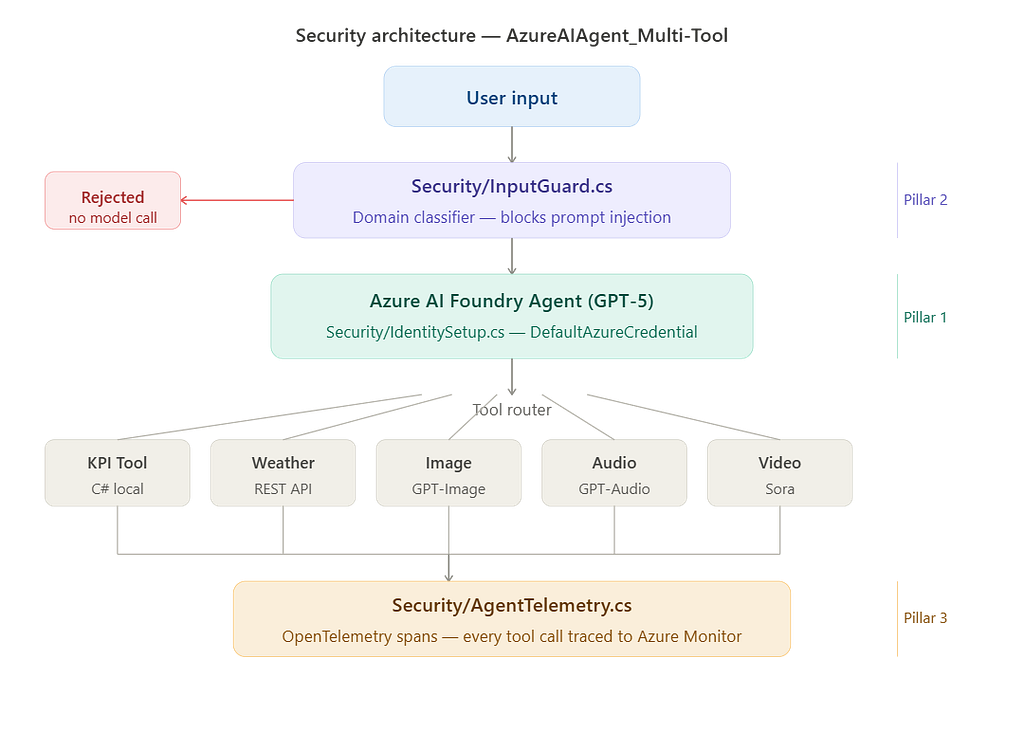
All the code in this post is drawn from a real working repo: AzureAIAgent_Multi-Tool — a .NET 8 multi-tool agent I’ve been building that connects to KPI lookups, Weather APIs, Image generation, Audio narration, and Video generation via Microsoft Foundry. If you want to see how these agents work before we talk about securing them, start with Build a Multi-Tool Azure AI Agent in .NET and Extending the Agent with Image, Audio, and Video.
Now let’s talk about securing it.
The threat model has changed. Our thinking hasn’t.
Here’s how most engineers think about agent security today:
- Add a system prompt with instructions on what the agent should and shouldn’t do.
- Call it “guardrails.”
- Ship it.
That thinking made sense when the agent was a chatbot returning text. It breaks completely when the agent can call your APIs, read your SharePoint files, send emails, execute code, or provision infrastructure.
A system prompt is an instruction. It is not an access control. An attacker who can influence the agent’s input can influence how it interprets that instruction.
OWASP named Prompt Injection as the number one risk in the LLM Top 10. It’s the AI equivalent of SQL injection: untrusted input changing the behavior of a trusted system. But unlike SQL injection, which has parameterized queries as a well-understood fix, prompt injection has no universal mitigation. The input and the instruction live in the same space.
The second risk that keeps me up at night is Excessive Agency: agents with more permissions than they need to do their job.
An agent that can read files probably doesn’t need to write them. An agent that can query a database probably doesn’t need to delete rows. An agent that can send a Slack message probably doesn’t need access to your entire workspace.
But because we’re in the early days, and because wiring up permissions is friction, most agents run with broad access. It’s the least-privilege problem, but at an agentic scale. One successful prompt injection, and you’ve handed the attacker everything the agent can touch.
The third risk is the one organizations discover too late: the lack of an audit trail. When an agent takes an action, can you answer these questions?
- Which agent took this action?
- What input triggered it?
- What tools did it call, in what order?
- Who authorized this agent to act on whose behalf?
If the answer is “we’d have to dig through logs,” you don’t have agent security. You have hope.
What the Foundry Control Plane actually gives you (and what it doesn’t)
Microsoft Foundry’s Control Plane shipped as part of the broader Foundry platform, and it’s genuinely useful. It gives you centralized observability, governance hooks, and policy enforcement across your agents in production.
If you haven’t already read Azure AI Foundry is now Microsoft Foundry: What Changed and Why It Matters, that’s a good primer on what the platform is before we talk about what the Control Plane does for security specifically.
But I’ve watched teams treat it as a checkbox. “We have the Control Plane turned on.” Full stop.
That’s not a security posture. That’s a dashboard.
Here’s what the Control Plane does well: it gives you visibility. You can see which agents are running, what tools they’re calling, and flag anomalous behavior. For compliance and audit readiness, this is meaningful.
Here’s what it doesn’t do for you: it doesn’t enforce least privilege on the tools your agent can access. That’s your architecture decision. It doesn’t prevent prompt injection. That’s your input handling. It doesn’t give your agent a proper identity. For that, you need Managed Identity, and most teams are still using API keys.
Let’s talk about that.
Every agent needs an identity. API keys aren’t one.
When a human employee joins your company, you don’t hand them a shared password that five other employees also use. You create an identity. You scope their access. You audit how they use it. You revoke access when they leave.
We should be doing the same for agents.
Azure Managed Identity gives each agent its own identity in Microsoft Entra ID. No credentials in code. No credentials in environment variables. No credentials that can be leaked in a stack trace or committed to GitHub.
In the AzureAIAgent_Multi-Tool repo, you’ll find Security/IdentitySetup.cs which centralises this:
using Azure.Identity;
using Microsoft.Extensions.Logging;

namespace AzureAIAgent.Security;

public static class IdentitySetup
{
    public static DefaultAzureCredential CreateCredential(ILogger? logger = null)
    {
        logger?.LogInformation(
            "Resolving Azure credential via DefaultAzureCredential. " +
            "Local: Azure CLI. Azure: Managed Identity.");

        return new DefaultAzureCredential();
    }
}
That single line is the difference between an agent that authenticates with a secret that can be stolen and one that authenticates with an identity that’s scoped, auditable, and revocable.
Once you have an identity, you can assign roles. And once you can assign roles, you can enforce least privilege.
An agent that needs to read from Azure Blob Storage gets Storage Blob Data Reader. Not Contributor. Not Owner. Storage Blob Data Reader.
An agent that needs to query Azure AI Search gets Search Index Data Reader. Not a connection string sitting in appsettings.json.
This isn’t new security thinking. It’s the same principle we apply to service accounts. We just haven’t been applying it to agents.
Input validation is not optional just because your input is natural language
One of the subtle mistakes I see in agent implementations is the assumption that because input is natural language, it can’t be validated.
It can be. It’s just different from validating a form field.
For agent inputs, validation means:
Constraining the input surface. If your agent is a customer support agent, it has no reason to accept instructions about code execution or system administration. Build a classification layer that routes or rejects inputs outside the agent’s intended domain before they ever reach the model.
Separating trusted from untrusted content. When your agent uses retrieval-augmented generation (RAG) to pull in documents, those documents are untrusted content. They should be clearly delimited in the prompt. Many teams mix user instructions, system instructions, and retrieved content in a flat prompt with no structural boundary. That’s asking for indirect prompt injection.
Validating tool outputs before acting on them. OWASP calls this Insecure Output Handling: the agent receives a tool’s response and passes it downstream without checking it. A malicious API response can redirect the agent’s next action. Always validate what tools return before the agent uses that output to make decisions.
The Security/InputGuard.cs class in the repo handles the first two:
csharp
public static ValidationResult Validate(string input)
{
    if (string.IsNullOrWhiteSpace(input))
        return ValidationResult.Reject("Input cannot be empty.");

    if (input.Length > 500)
        return ValidationResult.Reject(
            "Input is too long. Please keep queries under 500 characters.");

    var lower = input.ToLowerInvariant();

    foreach (var pattern in BlockedPatterns)
    {
        if (lower.Contains(pattern))
            return ValidationResult.Reject(
                $"Input contains a disallowed pattern: '{pattern}'.");
    }
    var hasKnownTopic = AllowedTopics.Any(topic => lower.Contains(topic));
    if (!hasKnownTopic)
        return ValidationResult.Reject(
            "That topic is outside this agent's scope.");
    return ValidationResult.Accept();
}
And for retrieved content, WrapRetrievedContent explicitly delimits untrusted data:
public static string WrapRetrievedContent(string content, string source)
{
    return $"""
        --- BEGIN RETRIEVED CONTENT FROM {source} ---
        {content}
        --- END RETRIEVED CONTENT ---
        """;
}
In Program.cs , The guard runs before any agent call:
var validation = InputGuard.Validate(userInput);
if (!validation.IsValid)
{
    Console.WriteLine($"[Rejected] {validation.RejectionReason}");
    continue;
}
None of this is magic. It’s the input validation discipline we apply to every other layer of the stack, applied to a new surface.
The audit trail is your last line of defense
Every action an agent takes in production should be traceable. Not for compliance theater. Because when something goes wrong, you need to be able to reconstruct exactly what happened.
I covered the full observability setup in a dedicated post: Observability for Microsoft Foundry Agents with Azure Monitor and OpenTelemetry (.NET First). That goes deep into tracing and evaluation. Here, I’ll focus on the security-specific layer.
OpenTelemetry with Azure Monitor gives you distributed tracing across agent tool calls. Combined with Foundry’s built-in observability, you can capture:
- The input that triggered the agent
- Every tool call the agent made, with its arguments and response
- The model’s reasoning steps (if using chain-of-thought)
- The final output and any downstream actions
The Security/AgentTelemetry.cs class in the repo sets up OpenTelemetry with Azure Monitor and provides a StartToolCall helper:
public static Activity? StartToolCall(string toolName, string input)
{
    var activity = Source.StartActivity(
        $"tool.{toolName}",
        ActivityKind.Internal);

    activity?.SetTag("tool.name", toolName);
    activity?.SetTag("tool.input.length", input.Length);
    activity?.SetTag("tool.input.preview",
        input.Length > 100 ? input[..100] + "..." : input);

    return activity;
}
Every tool handler wraps its call:
using var span = AgentTelemetry.StartToolCall("WeatherTool", location);
var weatherResult = await FetchWeather(location);
span?.SetTag("tool.result.city", location);
span?.SetTag("tool.result.temperature", weatherResult.Temperature);
At the top of Program.cs, The tracer is initialized once:
using var tracerProvider = AgentTelemetry.Build();
When APPLICATIONINSIGHTS_CONNECTION_STRING is set, traces go to Azure Monitor. In local development, they fall back to console output, so you get full visibility from day one without needing an Azure subscription to start.
This trace data is also your anomaly detection surface. If an agent that normally makes three tool calls per request suddenly makes forty, something has changed. Either the agent is being abused, or a prompt is leaking scope it shouldn’t have. Either way, you want to know before your customer does.
The production checklist we actually use
I’ve condensed this down to what matters in the real world. The full implementation is in the Security (folder of the repo).
I’ve condensed this down to what matters in the real world:
Identity and access
- Every agent runs under a Managed Identity, not a shared API key or connection string.
- Role assignments follow least privilege. Review them quarterly.
- Agent identities are tracked in your identity governance process, like human service accounts.
Input handling
- Untrusted content (user input, retrieved documents, API responses) is clearly delimited in prompts.
- A domain classification layer rejects out-of-scope inputs before they reach the model.
- Tool outputs are validated before the agent acts on them.
Observability
- Every tool call is traced with OpenTelemetry and shipped to Azure Monitor.
- The Foundry Control Plane is configured with baseline anomaly thresholds.
- You can answer “what did this agent do and why” for any request in the last 90 days.
Incident response
- You have a runbook for “agent is behaving unexpectedly.”
- You can revoke an agent’s Managed Identity and redeploy a clean version in under 15 minutes.
- You’ve run a tabletop exercise where the scenario is a prompt injection attack against your production agent.
That last one is the tell. If you haven’t thought through what an attack looks like, you haven’t done security engineering. You’ve done security theater.
The agent security conversation in the Microsoft ecosystem is still early. OWASP published the LLM Top 10. Microsoft published guidance on Foundry Control Plane. The Azure security team has published Managed Identity patterns for years.
The pieces are there.
What’s missing is the engineering culture that treats agent security as a first-class concern, not a post-launch checkbox. The same way we stopped bolting TLS on at the end and started building HTTPS in by default. In the same way, we stopped treating secrets in code as acceptable and started using Key Vault and Managed Identity.
Agents are not magic. They’re software. They have an attack surface, they have a blast radius, and they need security engineering.
The teams that figure this out first will ship agents their customers can actually trust in production. The ones that don’t will learn the hard way.
Start with identity. Add least privilege. Build the audit trail. Then you can talk about what your guardrails are doing.
If this article is your entry point, here is the full reading order for the agent series this repo supports:
- Build a Multi-Tool Azure AI Agent in .NET with Real-time REST API — where the agent starts: tool orchestration, KPI, and Weather integration
- Extending the Agent with Image, Audio, and Video Generation — multimodal capabilities using GPT-Image-1-Mini, GPT-Audio-Mini, and Sora
- Observability for Microsoft Foundry Agents with Azure Monitor and OpenTelemetry — full tracing and evaluation setup (goes deeper than this article on the observability pillar)
- Choosing the Right AI Model in Microsoft Foundry — how to pick from 11,000+ models without guessing
- A Production-Ready Copilot Workflow for .NET — the Copilot prompt patterns and copilot-instructions.md template my team uses day to day
The companion GitHub repo for this article: github.com/divyeshg94/AzureAIAgent_Multi-Tool
The three security classes are in the Security/ folder. Clone it, run az login, set AZURE_AI_PROJECT_ENDPOINT, and dotnet run. No API keys required.
If this article helped you think differently about how you’re securing your agents, give it some claps. If you disagree with any of it, leave a comment. I would be happy to know what I got wrong.
You can follow me on LinkedIn or find me on Microsoft Q&A, where I answer Azure and .NET questions regularly.
AI agents need security engineering, not just guardrails was originally published in Level Up Coding on Medium, where people are continuing the conversation by highlighting and responding to this story.